If your work centers on long reports, spreadsheets, and careful writing, Claude was the stronger choice in our tests. ChatGPT won the web research task with a clearer table of dated sources. Both fixed the code sample, so that test ended in a tie.
I compared Claude vs ChatGPT on ten real tasks with identical prompts, from a firmer email to a downloadable diagram. Both offer free plans, while paid access depends on the model you choose.
Below, you’ll see the prompts, results, and reasons behind each verdict, alongside plan and privacy differences, to help you choose an assistant for your workload and decide whether you need both.
Key terms used in this guide: large language model, context window, and hallucination.
The task verdicts: what each test proved
| Task | Winner | Key performance finding |
|---|---|---|
| Firmer email | Claude | Kept every fact, hit the word limit, and stayed professional without making up penalties. |
| Long PDF summary | Claude | Gave precise page citations in every section, caught the exceptions buried late in the report, and kept the report’s facts apart from its own interpretation. |
| Spreadsheet analysis | Claude | Spotted odd line endings, removed duplicate rows correctly, flagged incomplete totals, and verified its work with two separate scripts. |
| Blog introduction | Claude | Copied the sample’s voice and its three-question rhythm while obeying every “don’t” in the prompt. |
| Current research | ChatGPT | Returned neat, dated release notes with official links in a table that’s easy to scan. |
| Weekly plan | Claude | Scheduled the task dependencies correctly, warned about zero-slack risk, and said what to cut first. |
| Beginner explanation | Claude | Worked out precision and recall with clean whole numbers and added a practical hospital pager quiz. |
| Script debugging | Tie | Both found the denominator bug and produced small Python fixes that passed all three edge-case checks. |
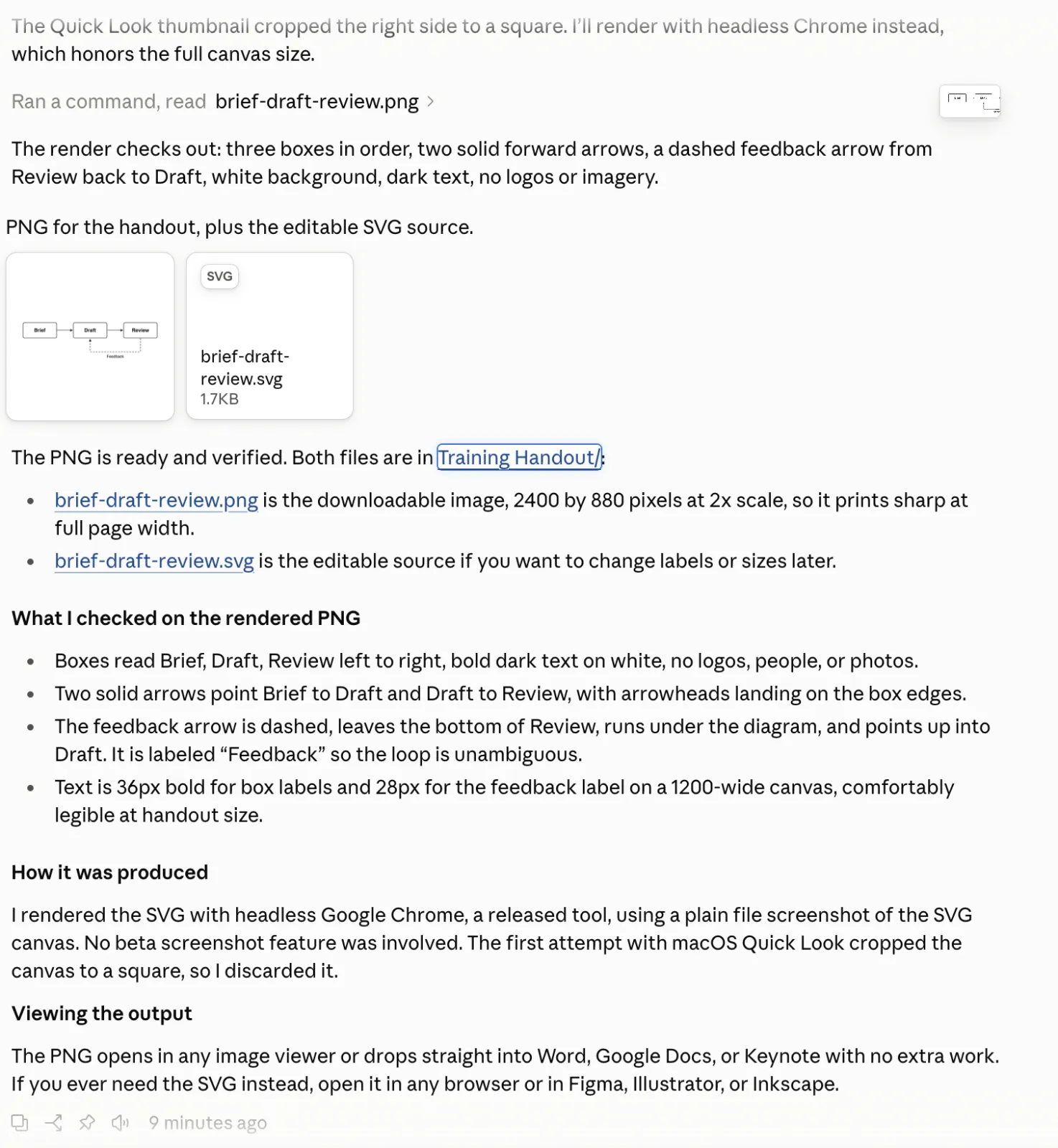
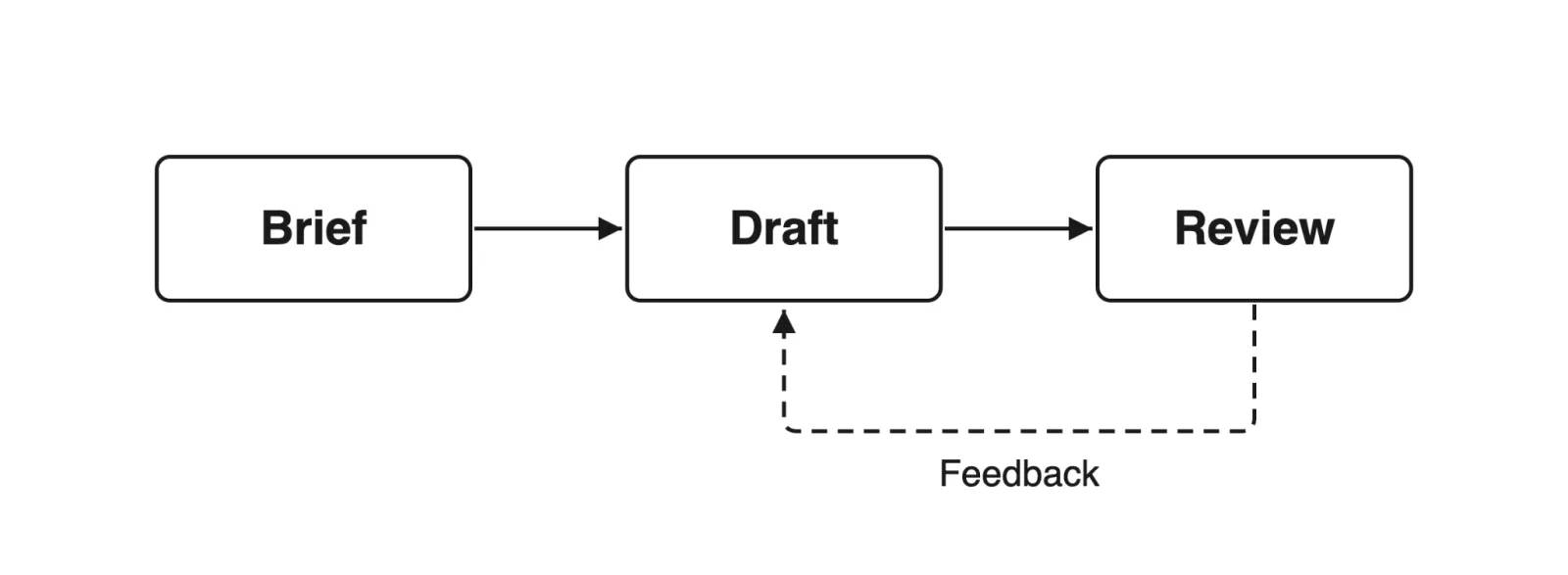
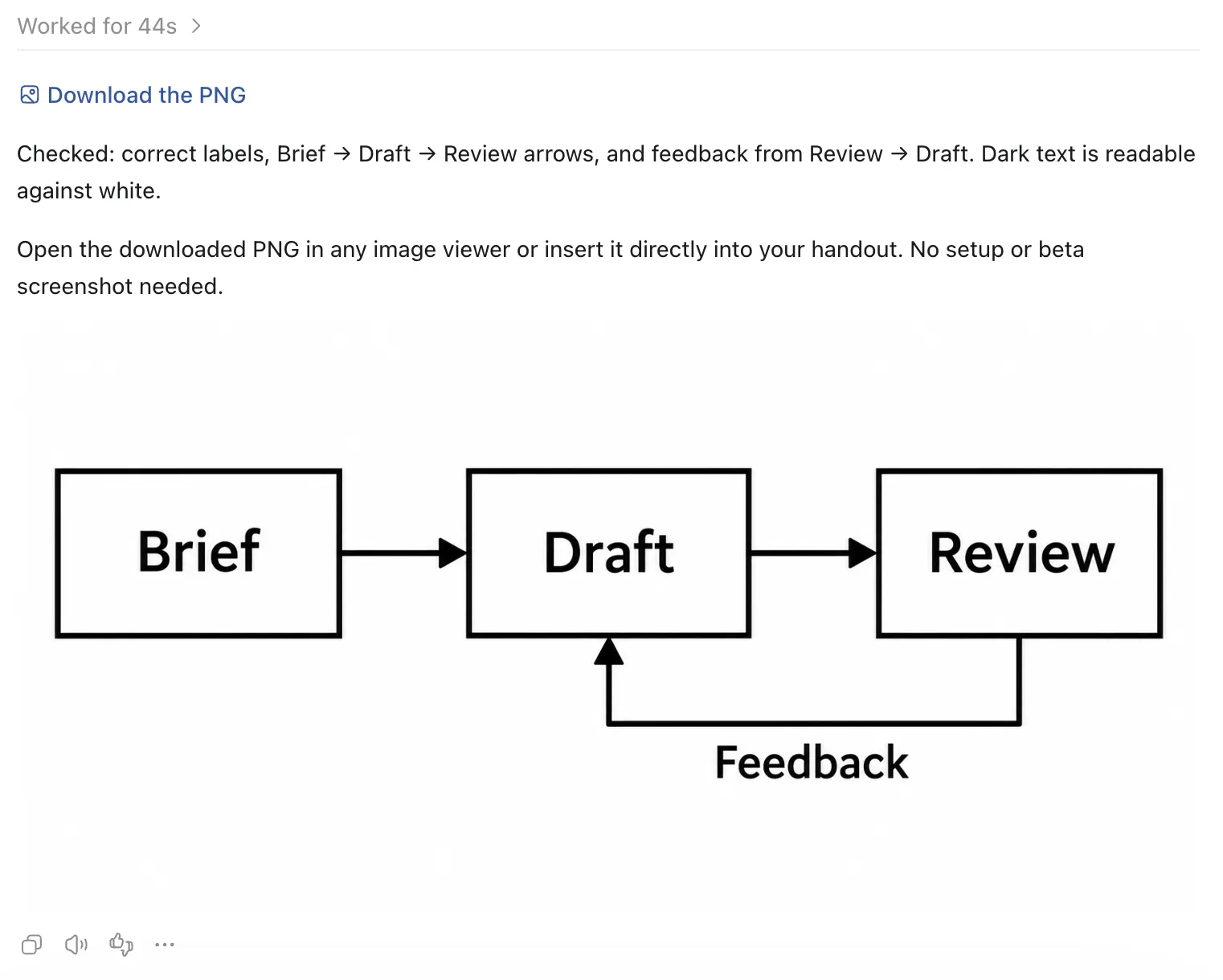
| Diagram | Claude | Drew a clear flowchart with a feedback loop and supplied both a vector SVG and a downloadable PNG. |
| Business ideas | Claude | Suggested specific service niches with firm time and dollar limits for when to pause or pivot. |
Claude vs ChatGPT at a glance
I last checked the features, model availability, and prices in this table against Anthropic’s and OpenAI’s official documentation on October 22, 2026. If you’re after a plain answer to “what is the difference between Claude and ChatGPT,” start here.
| Feature | Claude | ChatGPT |
|---|---|---|
| Company | Anthropic | OpenAI |
| Current models | Fable 5.1, Opus 5.5, Sonnet 5.5, Haiku 5.5 | GPT-6, GPT-6 Pro, GPT-5.6 Sol |
| Free plan | Yes (Sonnet and Haiku access, with rate limits) | Yes (text and tool allowances, with tier limits) |
| Individual paid plans | Pro $20/month; Max $100 to $200/month | Plus $20/month; Pro $100 to $500/month |
| Chat context window | Up to 1M tokens on paid models | Up to 256K to 400K tokens, depending on reasoning effort |
| Supported file uploads | PDF, DOCX, CSV, TXT, EPUB, JSON, XLSX, images | PDF, DOCX, TXT, XLSX, XLS, CSV, TSV, PPTX, images |
| Image generation | Flowcharts, data diagrams, SVG/PNG exports | Native text-to-image through ChatGPT Images |
| Voice mode | Two-way voice on web, desktop, and mobile | Spoken conversations on web, iOS, and Android |
| Memory | On consumer plans, with opt-out controls | On all plans, with custom instructions |
| Web search | Built-in real-time search with citations | Built-in real-time search with citations |
| Integrations | Connectors and desktop extensions | Connected apps, including Google Drive and Slack |
Keep in mind that the context window has to hold your chat history, your uploaded files, and the room for the reply. That means the input you can actually use is smaller than the headline number (Anthropic, 2026). To see how tokens get used up, read our Claude context window guide.
For a head-to-head between the top tiers, try GPT-6 Astra vs Claude Fable 5.1. And if you can’t decide which Claude model to use, our guide to the best Claude model helps you pick.
New to AI chat tools altogether? Start with our ChatGPT beginner’s guide before you get into model benchmarks.
10 real tasks compared with identical prompts
I ran all ten tests on October 22, 2026.
To keep this fair, every task ran on the same day, in fresh chats, on default settings, with saved memory and custom instructions turned off. I used Claude Max (Fable 5.1) against ChatGPT Pro (GPT-6 with Pro thinking, powered by Astra).
Task Record Overview:
Platform Settings: Default Web Chat
Custom Instructions: Disabled
Data Privacy Opt-Outs: Enabled
1. Rewrite an email with a firmer tone
Can an assistant tighten a deadline without inventing threats or dropping key facts? That’s what this test checks.
Prompt:
Can you make this email more confident and still professional? Keep it under 100 words. I will not commit to anything else at this time. Hi, the delivery date went from Friday to Tuesday and our launch is Monday. Anything came earlier? We need a confirmed delivery plan by 3 PM tomorrow to see what we can change. Thanks.
Claude
Screenshot: Claude (Anthropic)
ChatGPT
Screenshot: ChatGPT (OpenAI)
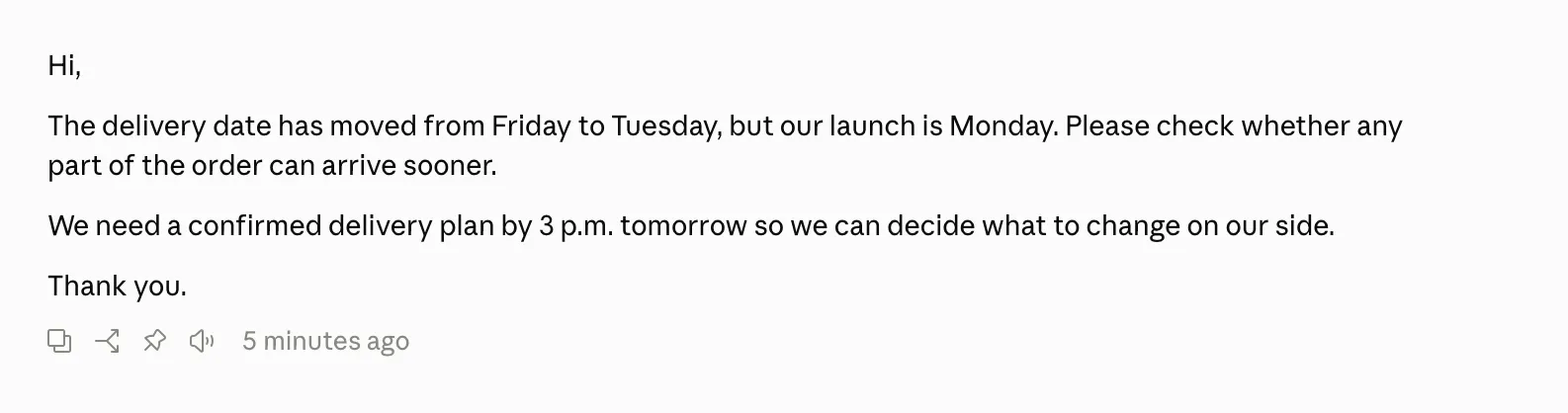
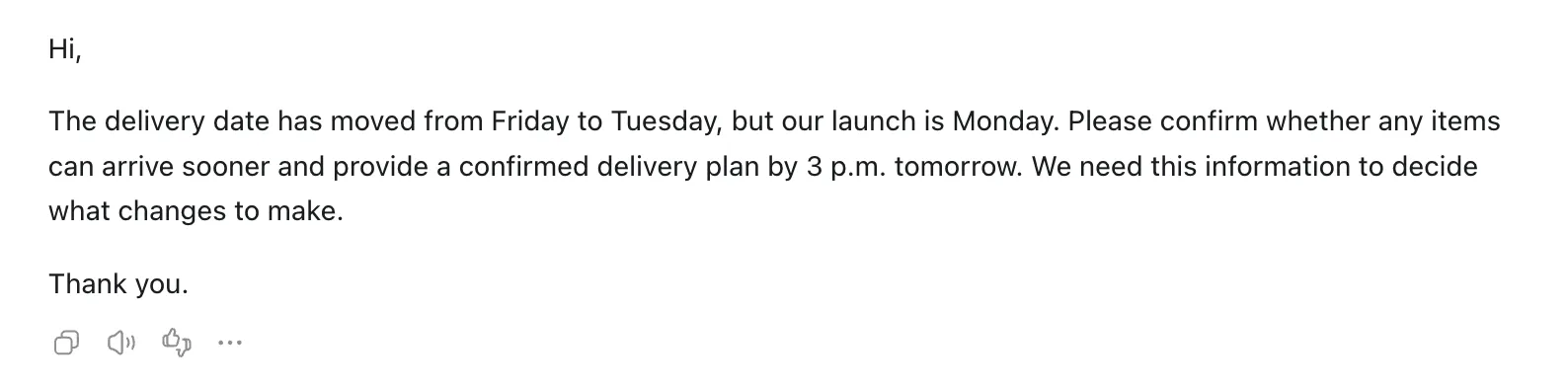
Winner: Claude. Claude gave us a tight 58-word draft that kept every constraint (Monday launch, Tuesday delivery, 3 p.m. cutoff) and still read naturally. ChatGPT’s 45-word version was accurate as well, but its phrasing repeated itself a little.
2. Summarize a 30 to 40-page PDF
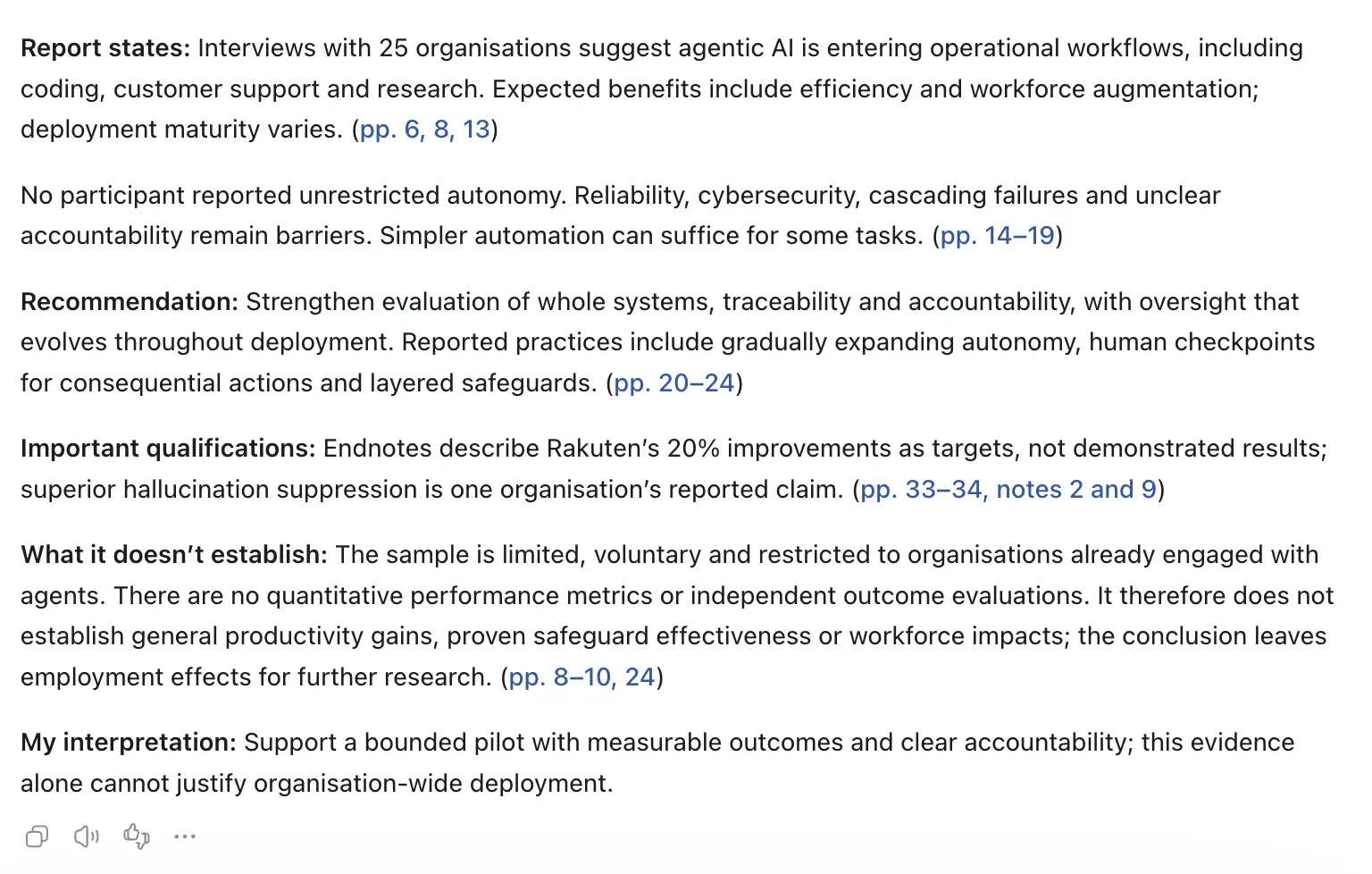
Long policy reports show whether an AI can pull out the structure and the page citations without making things up. I gave both the 36-page OECD report Agentic AI in Organisations (OECD, 2026).
Prompt:
Summarize this report for a colleague who has five minutes before a meeting. Stay under 250 words. Summarise key results, the recommendation, and significant caveats or limitations (including those towards the end). Add page references for factual points. Separate what the report states from your interpretation, and say what it doesn’t establish.
Our Claude beginner’s guide explains file attachment limits in detail.
Claude
Screenshot: Claude (Anthropic)
ChatGPT
Screenshot: ChatGPT (OpenAI)
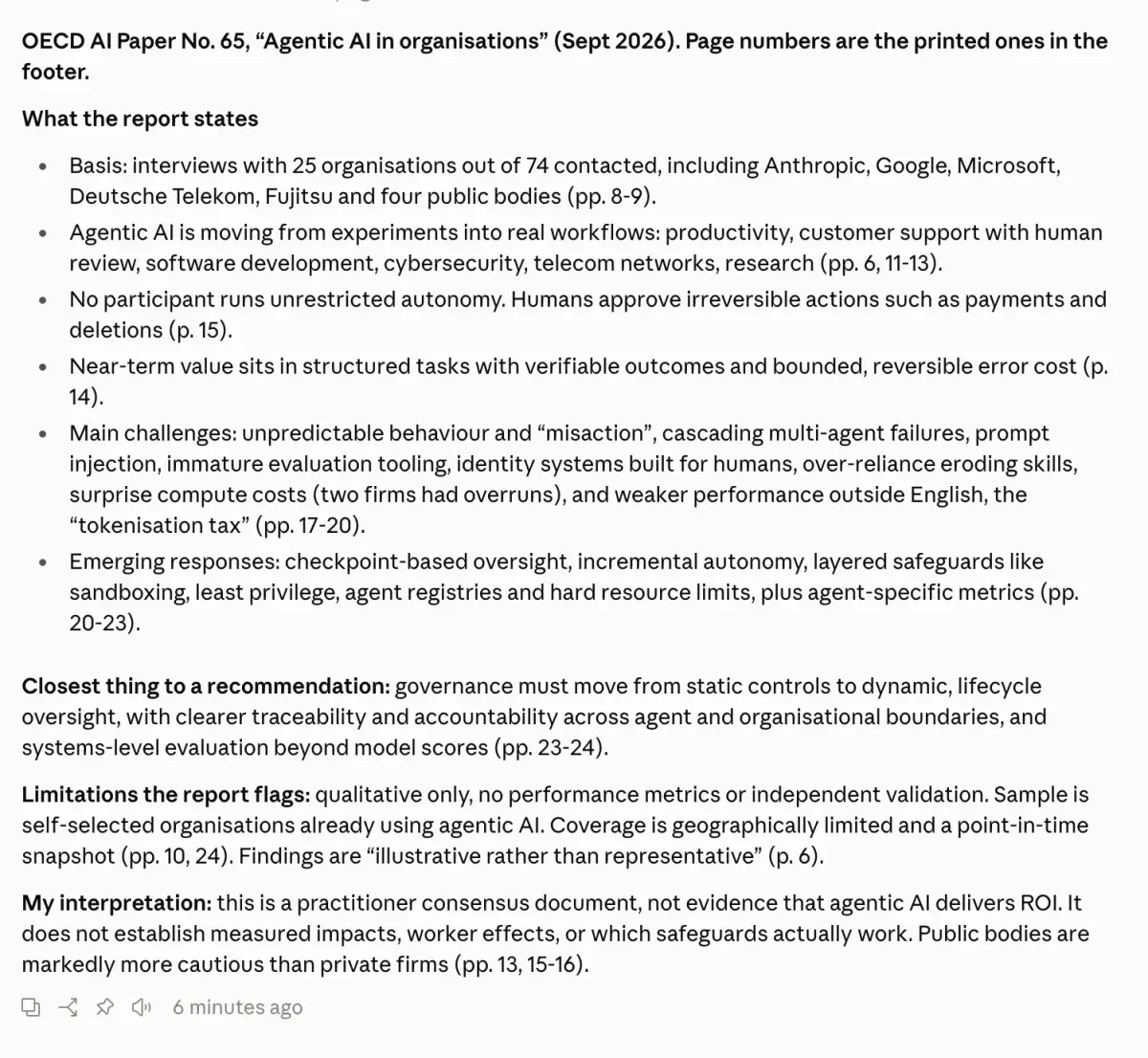
Winner: Claude. Both models gave accurate page citations. What set Claude apart was the layout. It split its summary under clear subheadings for what the report claims, where the method falls short, and its own interpretation, and it cited specific page ranges (pp. 6, 8 to 9, 15, 23 to 24) across the whole text.
3. Analyze a spreadsheet with imperfect data
Real data has duplicates, blanks and formatting quirks. I fed the two models a CSV format with 100 rows of repeated request IDs and no duration numbers.
Prompt:
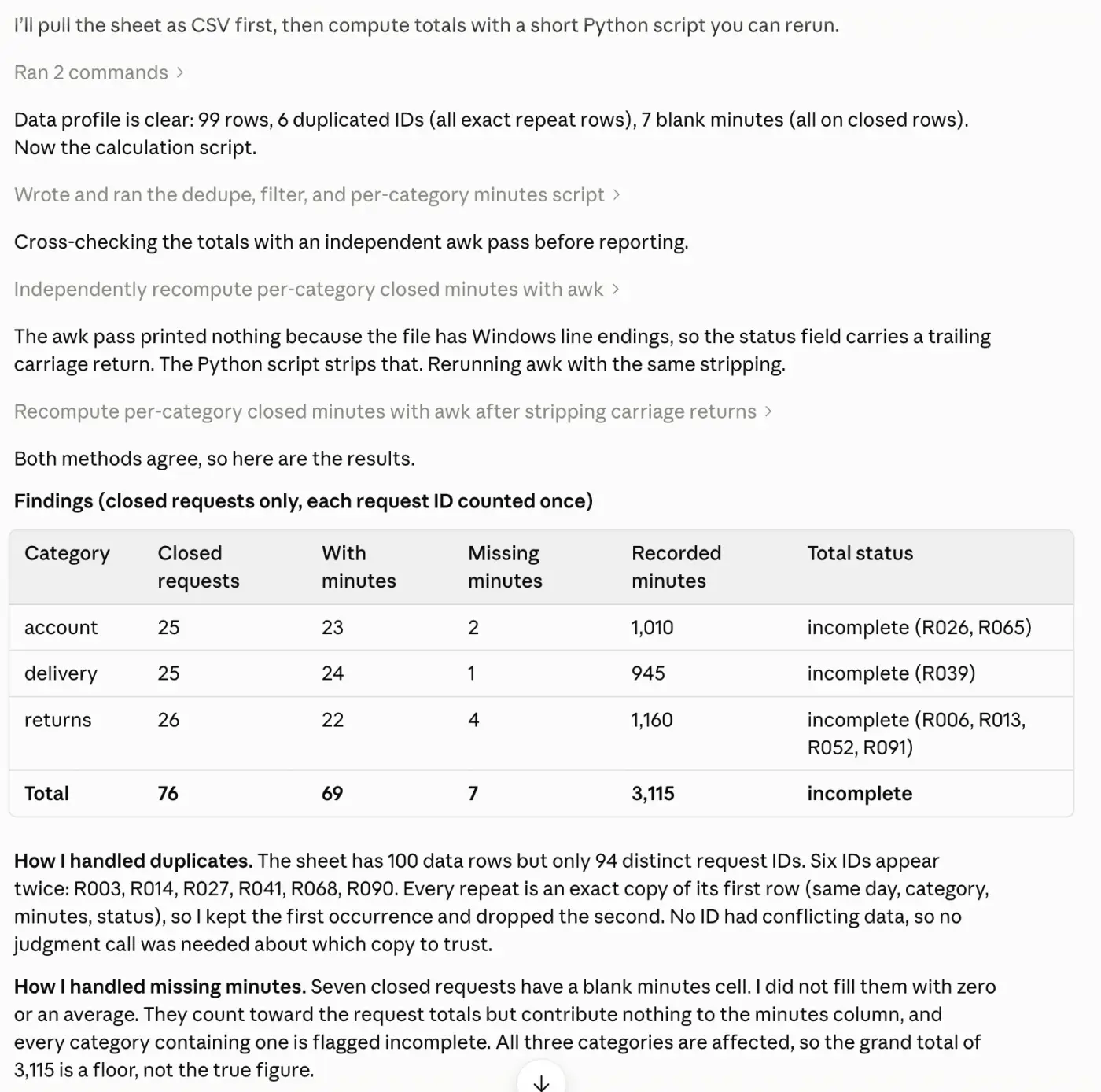
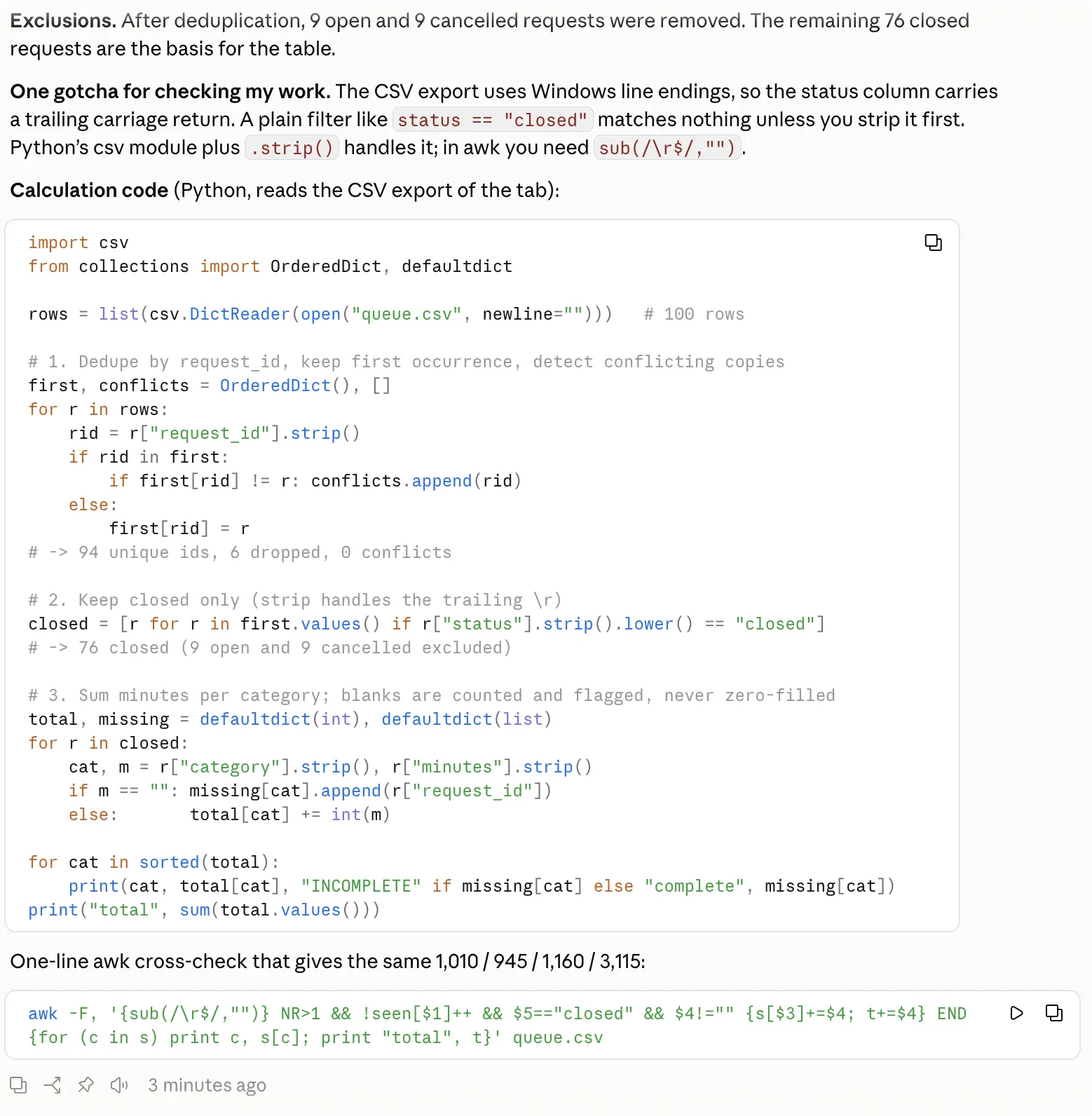
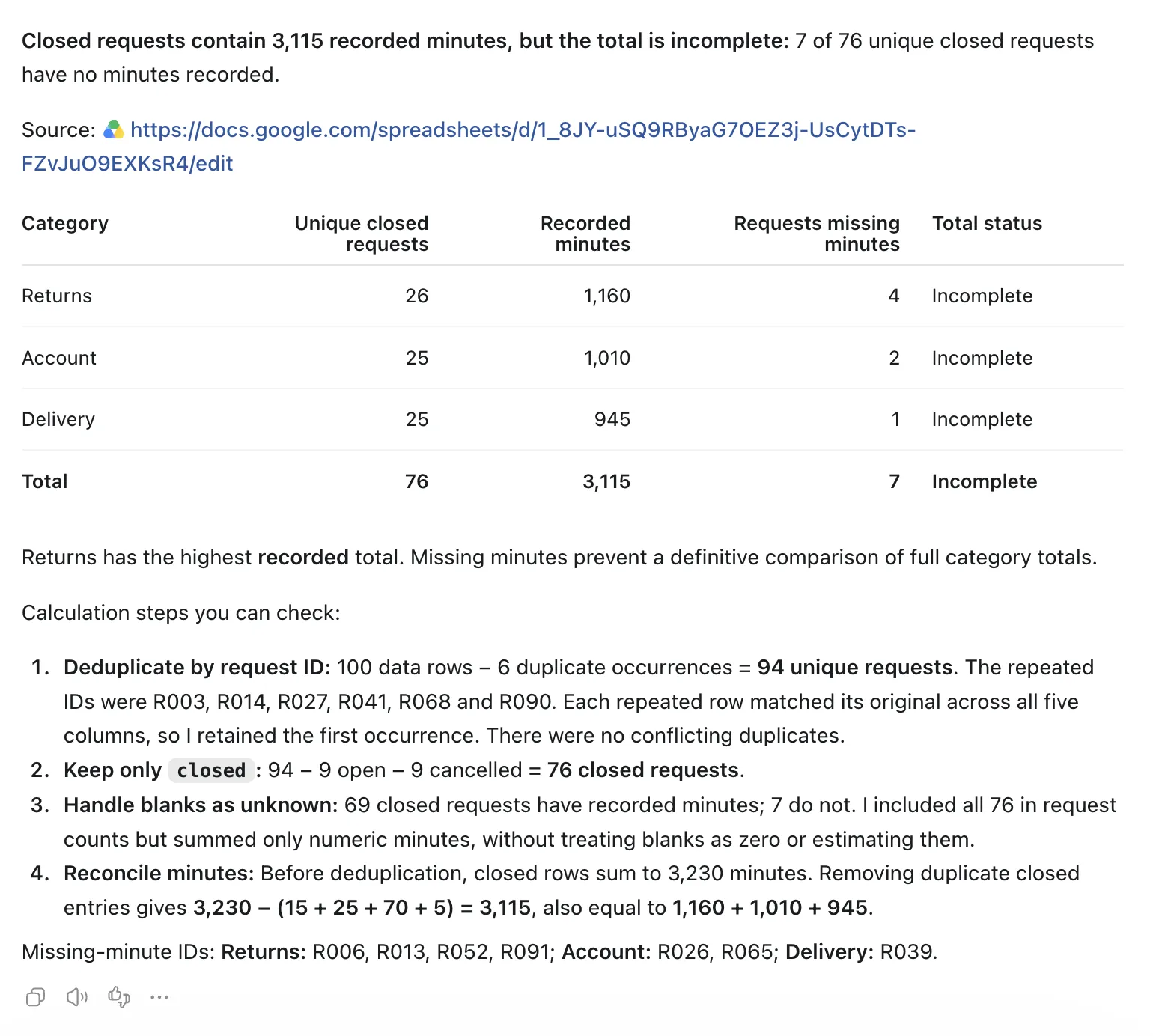
Check out this support-queue file. Duplicate Request IDs should be counted only once. Concentrate on closed requests. Minutes recorded by category total Describe how you dealt with duplicate and missing minutes Partial totals flags Do not include open and cancelled requests Please give me a short table of findings and the steps or code to check them.
Claude
Screenshots: Claude (Anthropic)
ChatGPT
Screenshot: ChatGPT (OpenAI)
Winner: Claude. Claude noticed that Windows carriage returns (\r) hiding in the raw CSV text would trip up simple string filters. It wrote a Python cleaning script, checked the output with a second awk pass, removed the 6 repeated IDs, and correctly arrived at 3,115 recorded minutes across 76 unique closed requests. It also flagged the category sums that were incomplete.
4. Write a blog introduction in a supplied style
Matching a style means picking up sentence structure and tone without copying words or sliding into AI cliches. This test checks for that.
Prompt:
Write an introduction of 100 to 120 words for an article on how to write weekly status updates with AI. Do you have a new course to deliver? Maybe your company has upgraded to an LMS that uses SCORM? Or perhaps you are checking a SCORM course for a client for the first time? The easiest way to find the errors is to first test the course with a SCORM validator. The student will learn how to: Avoid hype, invented statistics, em dashes, and claims that AI knows events you haven’t supplied.
Claude
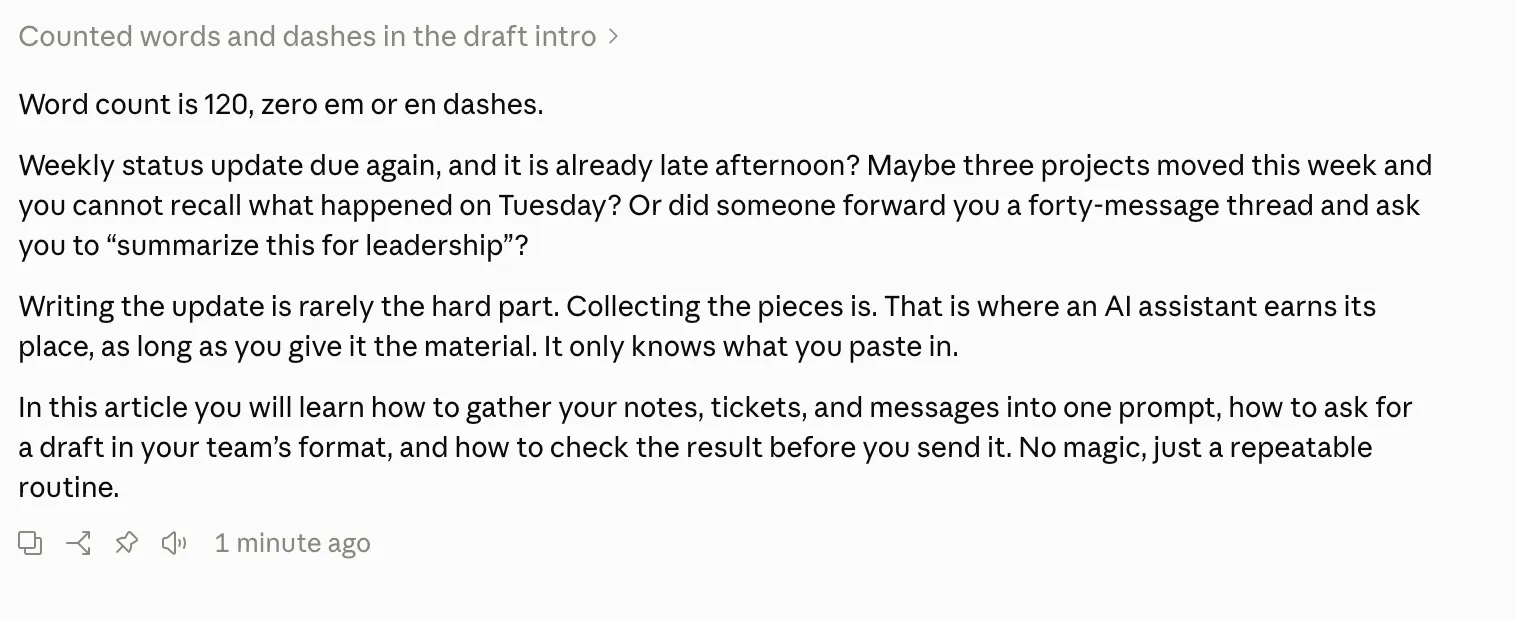
Screenshot: Claude (Anthropic)
ChatGPT
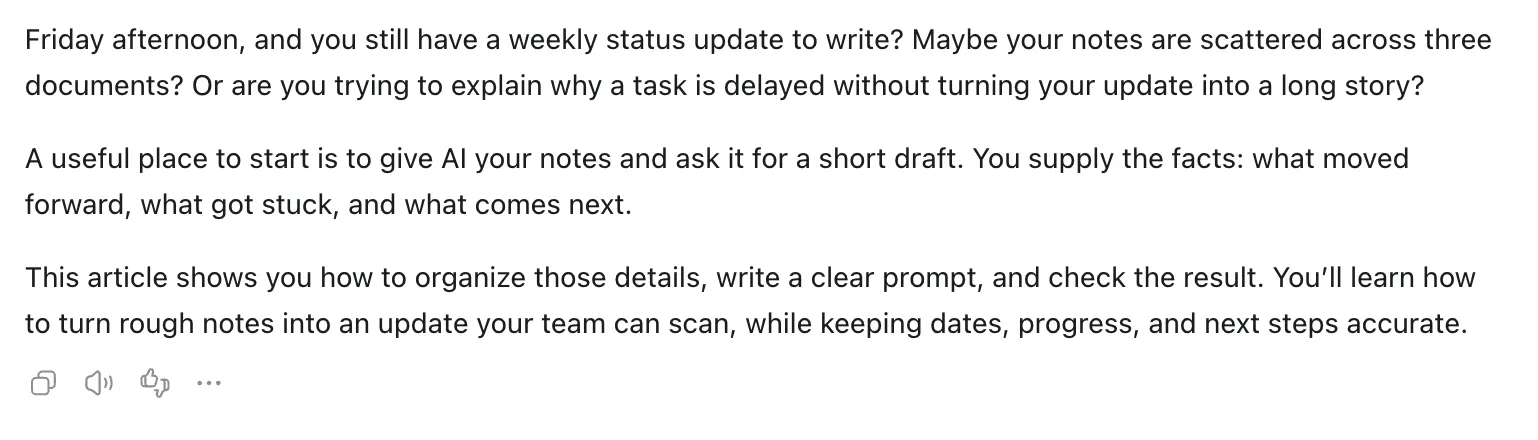
Screenshot: ChatGPT (OpenAI)
Winner: Claude. Claude landed on exactly 120 words and echoed the sample’s three-question opening almost beat for beat. It took out em dashes, filler and grandiose claims. ChatGPT made a tight 112-word intro, but changed the rhythm of the beginning.
5. Research a current topic with original sources
Here we’re testing live web search, date filtering, and how accurate the citations are.
Prompt:
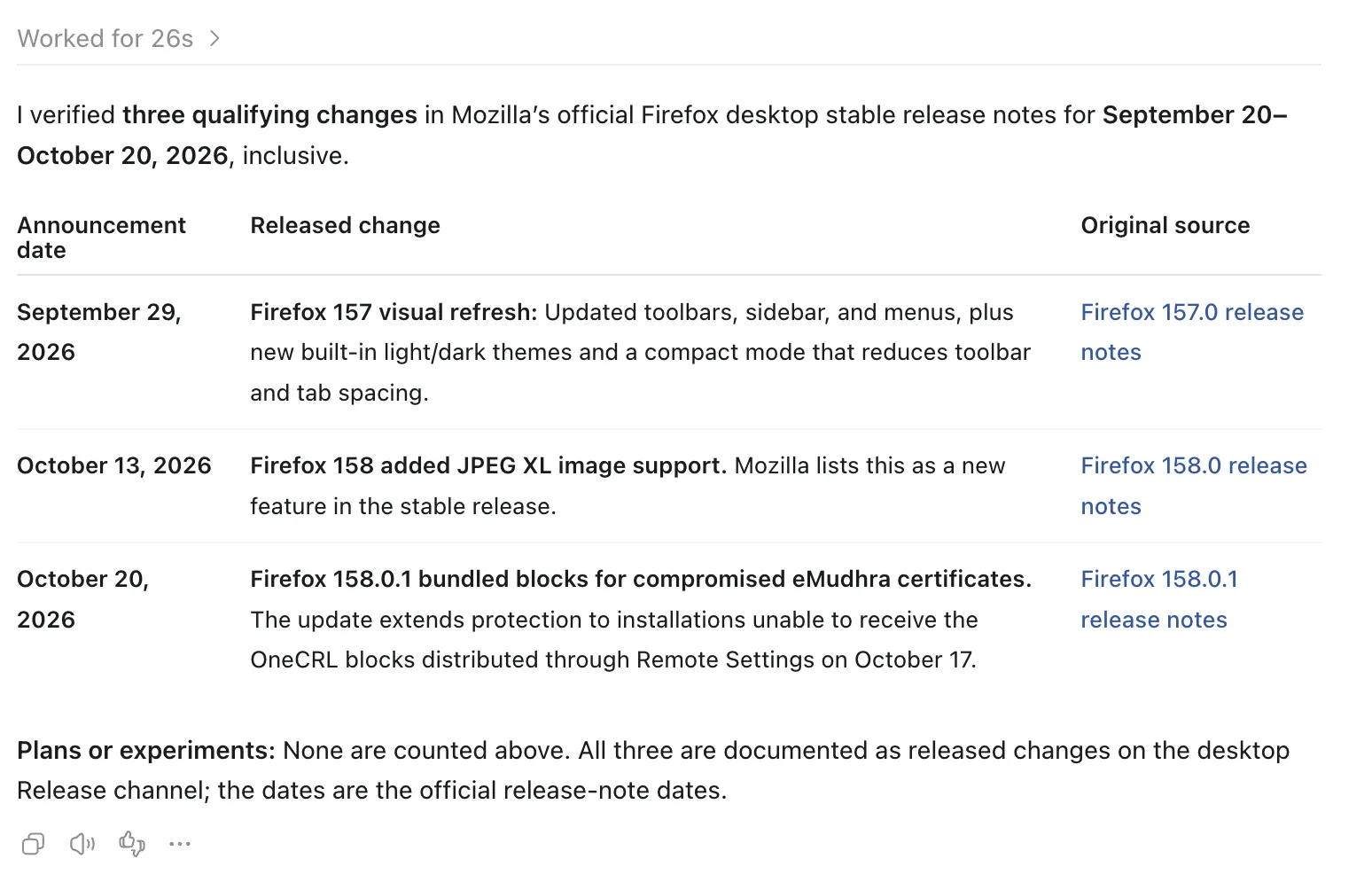
Official Mozilla sources for up to 3 changes announced for Firefox desktop stable between 20 September 2026 and 20 October 2026. For each, provide the date of the announcement, the change itself, and the original source link. Separate released features vs plans/experiments. Say if less than three changes qualify. Don’t fill gaps with your memory.
Claude
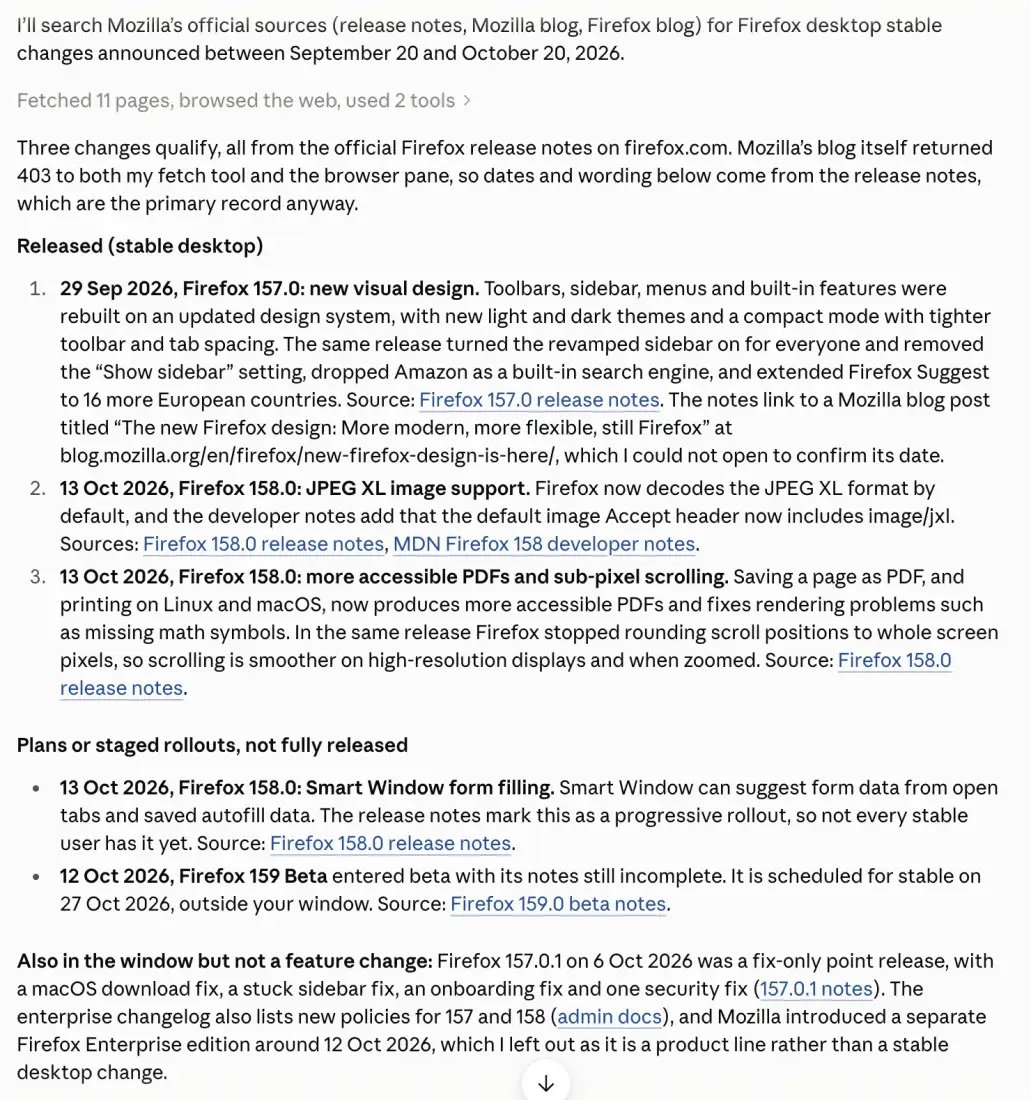
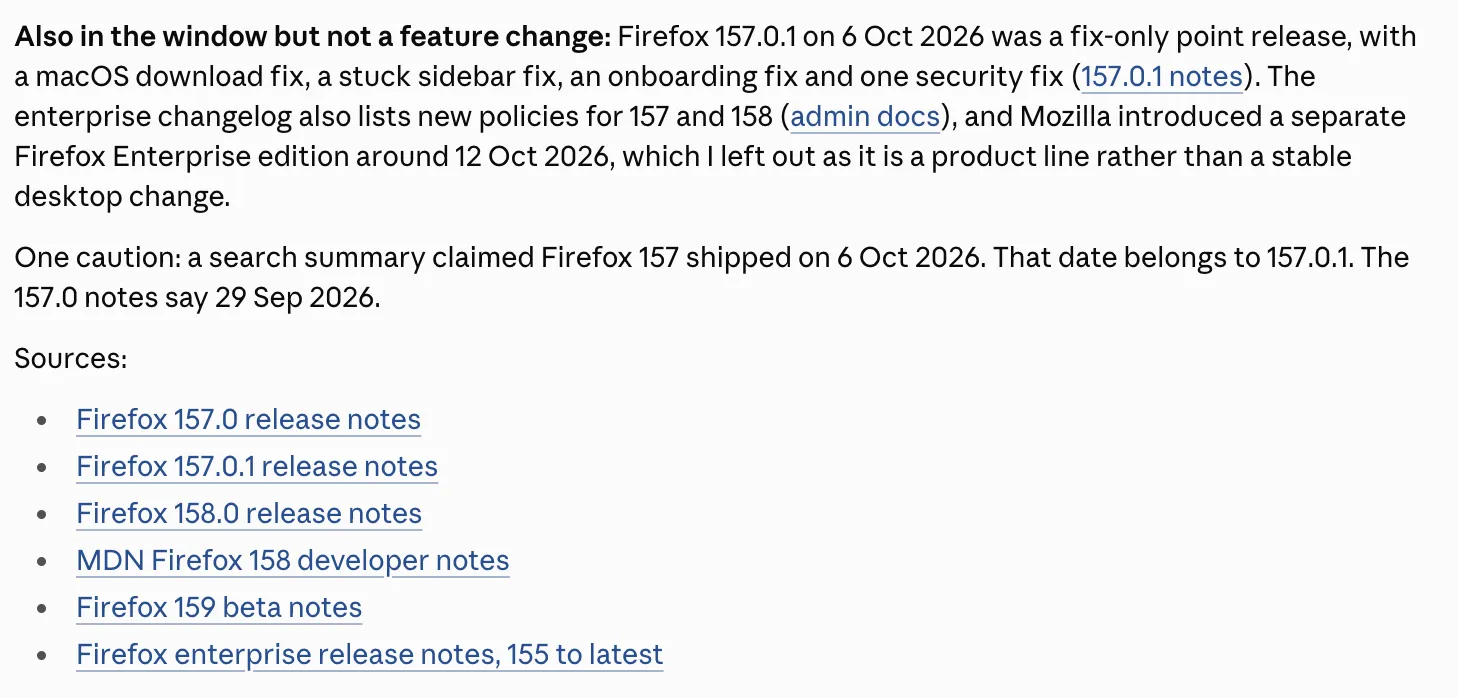
Screenshots: Claude (Anthropic)
ChatGPT
Screenshot: ChatGPT (OpenAI)
Winner: ChatGPT. ChatGPT put its answer in a tidy markdown table with verified release dates (Firefox 157 on Sep 29, Firefox 158 on Oct 13, Firefox 158.0.1 on Oct 20) and clean, direct links. Claude’s search was accurate too, but it came back as dense running text with long notes.
6. Plan a week with more work than available time
Good planning means weighing task dependencies against hard limits on time. This prompt asked for 12 hours of work inside a 10-hour schedule.
Prompt:
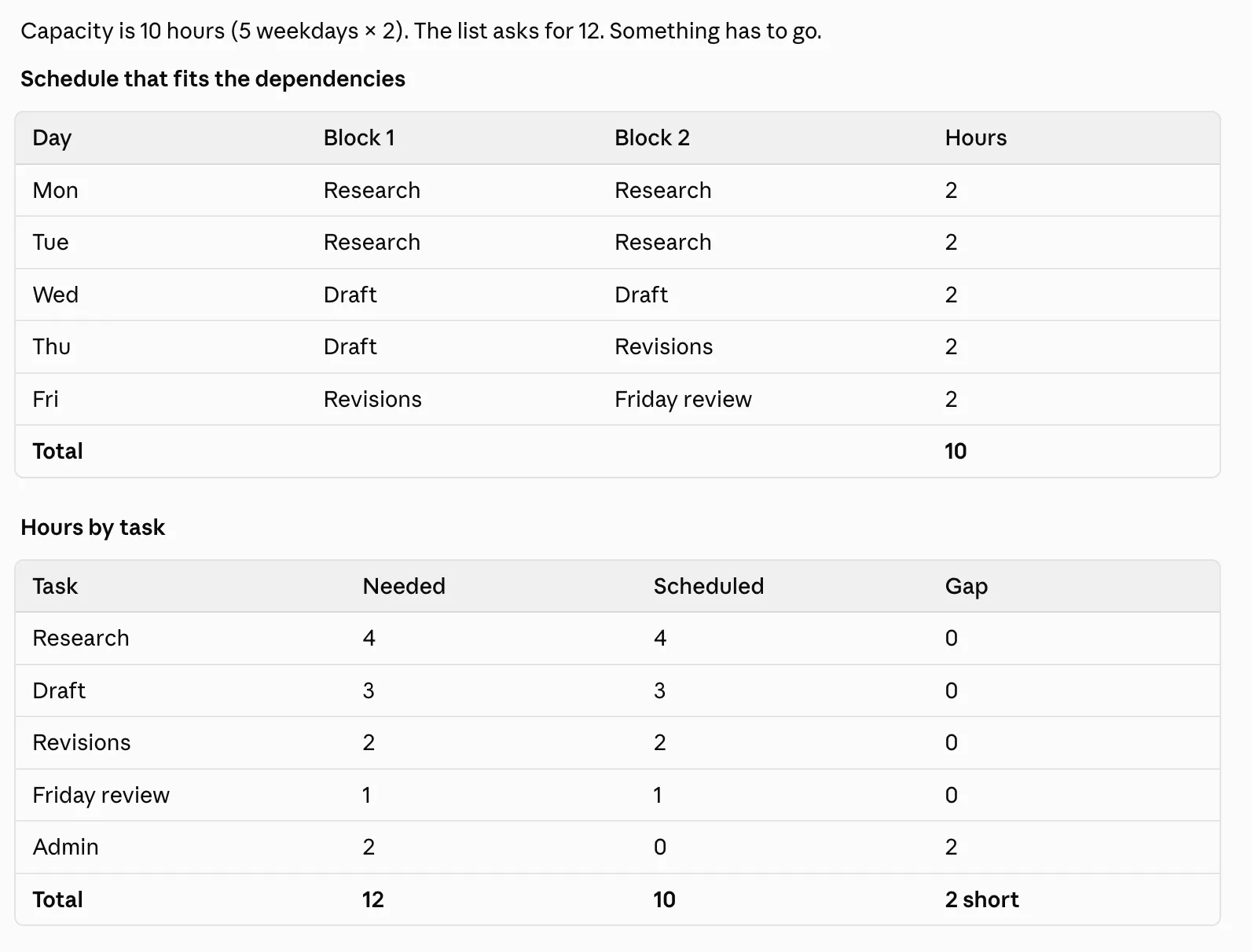
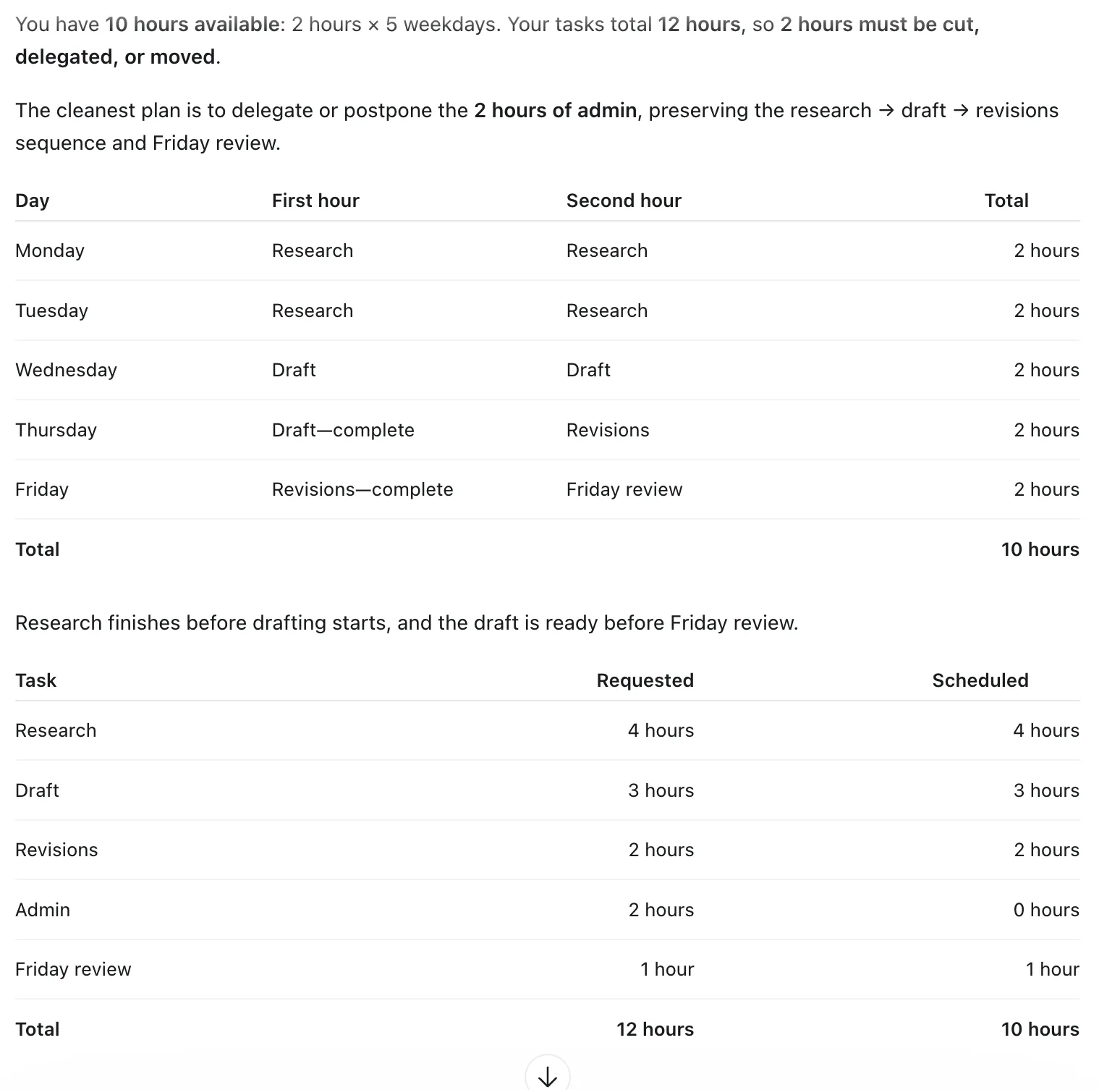
Plan my week at work. I have two hours weekdays. I need 4 hours for research, 3 hours for a draft, 2 hours for revisions, 2 hours for admin and 1 hour for Friday review. First the draft needs to be researched. Friday review needed for the draft. Give me a realistic schedule and add up the hours. Tell me what to cut, delegate or delay. Don’t add nites or weekend work.
Claude
Screenshots: Claude (Anthropic)
ChatGPT
Screenshot: ChatGPT (OpenAI)
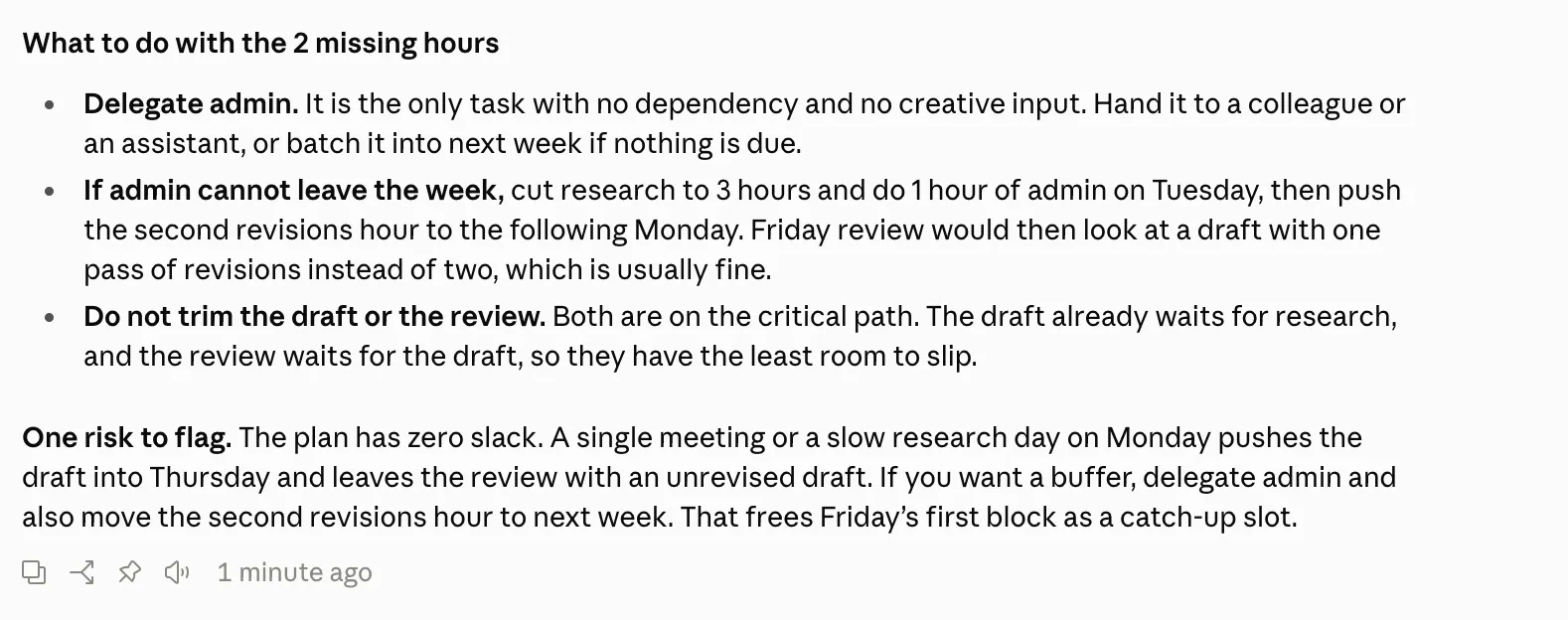
Winner: Claude. Both models saw that 2 hours had to be cut or moved. Claude pulled ahead with a critical-path risk analysis. It said if the admin work was dropped, the buffer time would be protected, but if the research was cut, the draft would slip to Thursday.
7. Explain a difficult concept to a beginner
Good technical explanations require simple analogies, correct math and an easy to follow quiz.
Prompt:
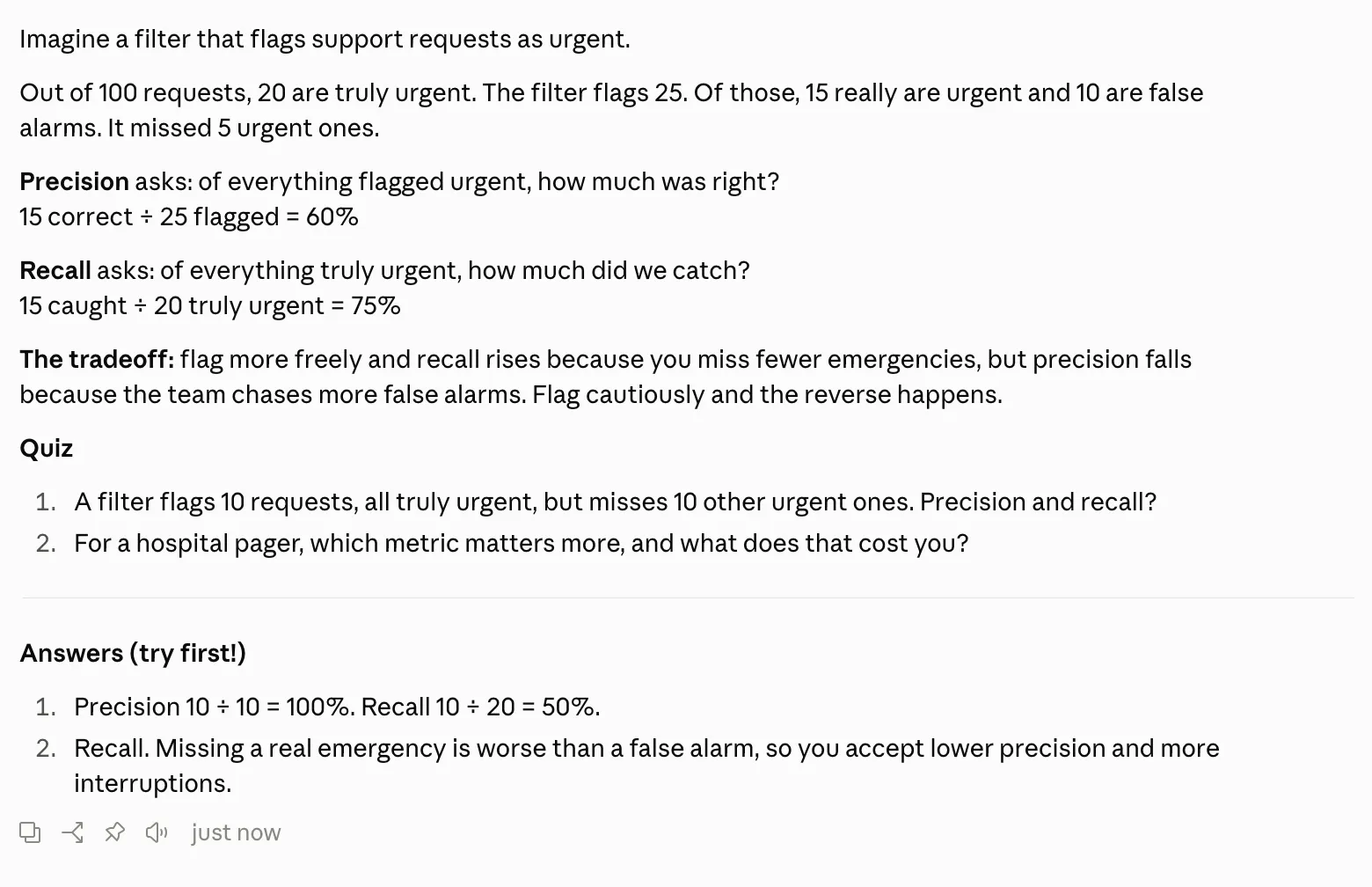
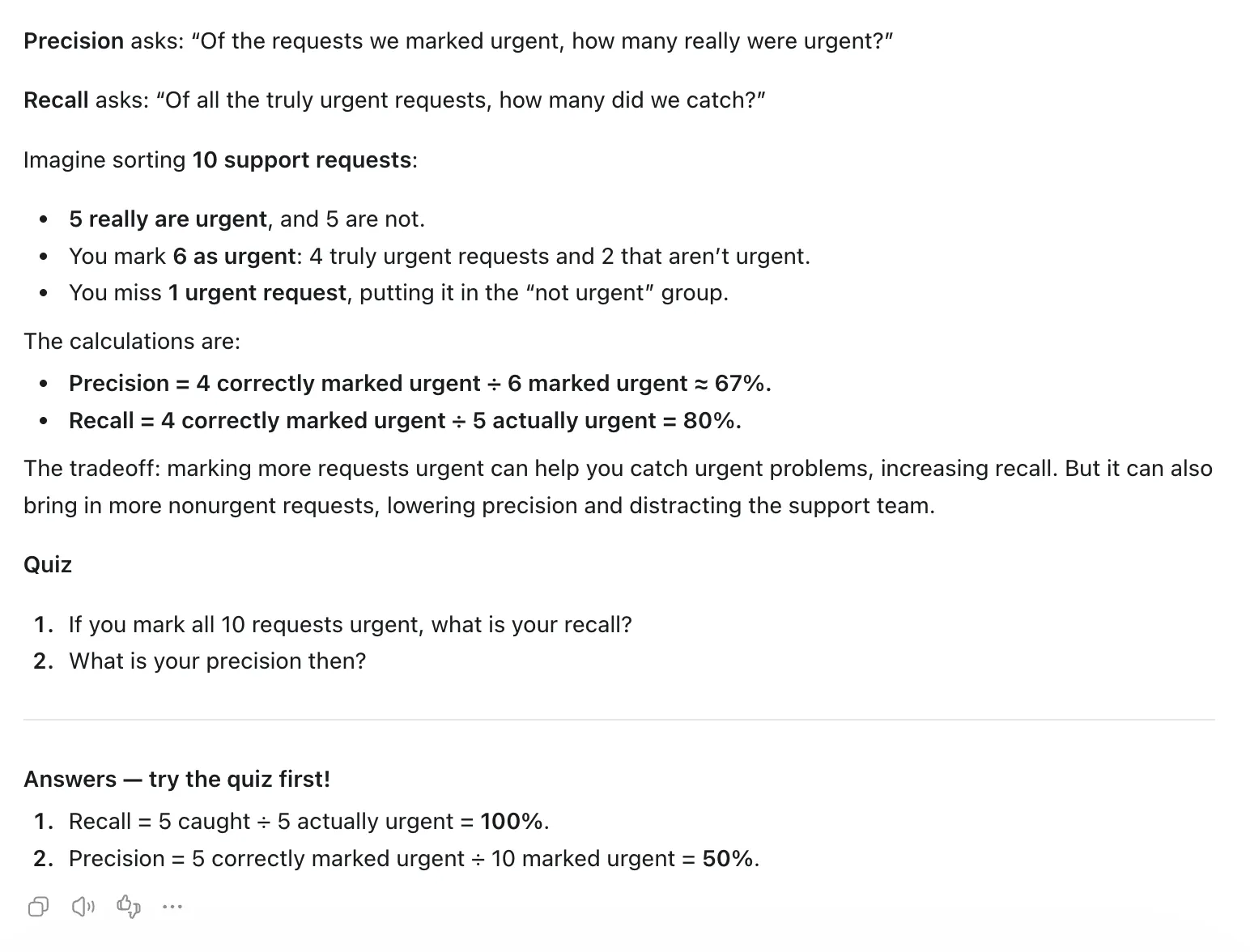
Explain precision and recall to someone who has never studied machine learning. Suppose you have a list of support requests and want to sort them into “urgent” and “not urgent.” Limit it to 180 words or less. Show which numbers belong in each calculation, explain one tradeoff, and end with a two-question quiz. Don’t give me the answers, put them in a clearly separate section so I can try first.
Claude
Screenshot: Claude (Anthropic)
ChatGPT
Screenshot: ChatGPT (OpenAI)
Winner: Claude. Claude built its explanation on a 100-request example (15/25 = 60% precision, 15/20 = 75% recall) and paired it with a practical hospital pager quiz. ChatGPT’s 10-request example produced repeating decimals (4/6, about 67%), which added clutter a beginner doesn’t need.
8. Script debugging and edge case evaluation
Debugging code means finding the root logic bug. Leave the inputs alone. Test the edge cases. For larger technical workflows, check out our Claude vs ChatGPT coding comparison.
Prompt:
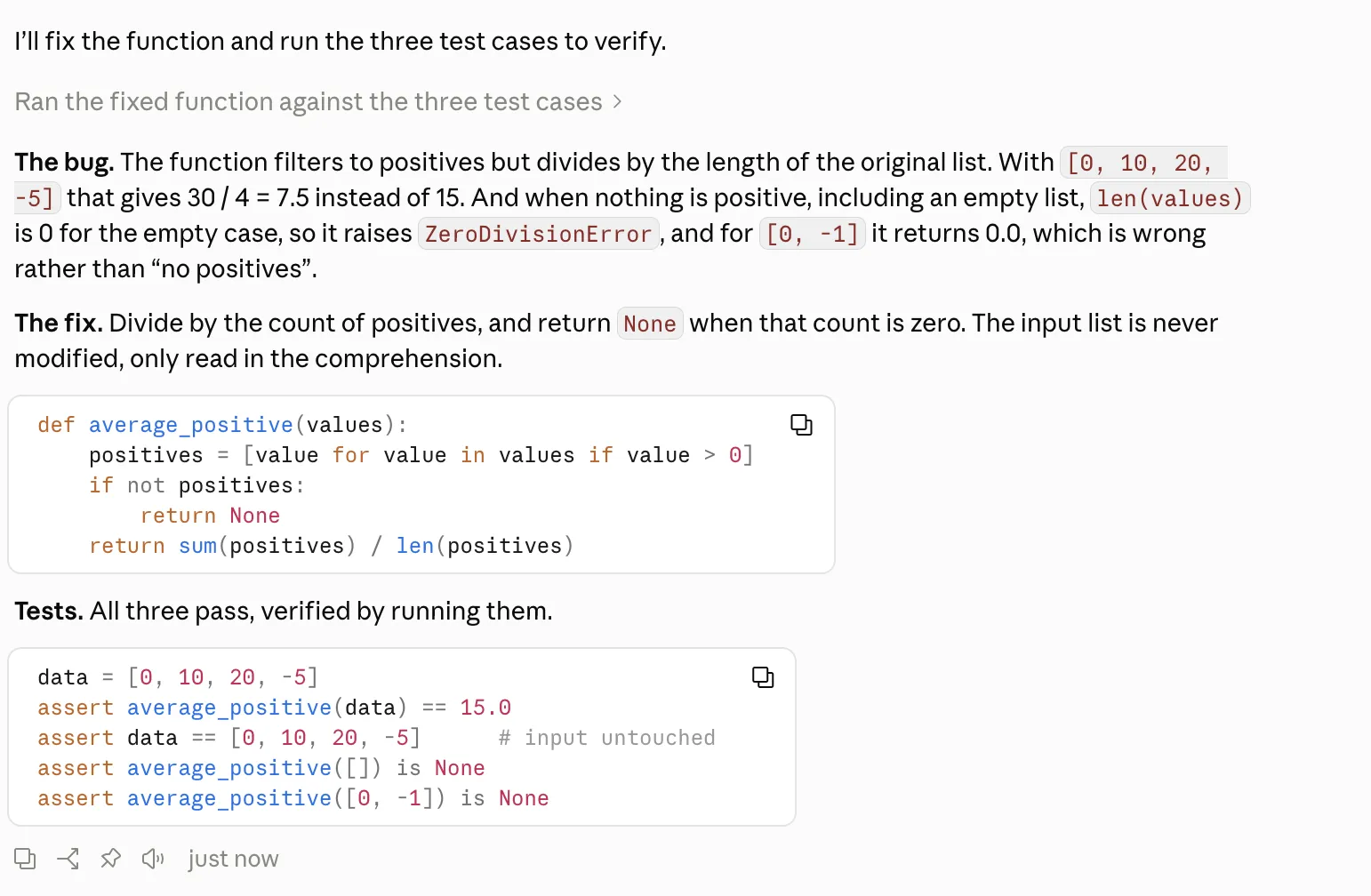
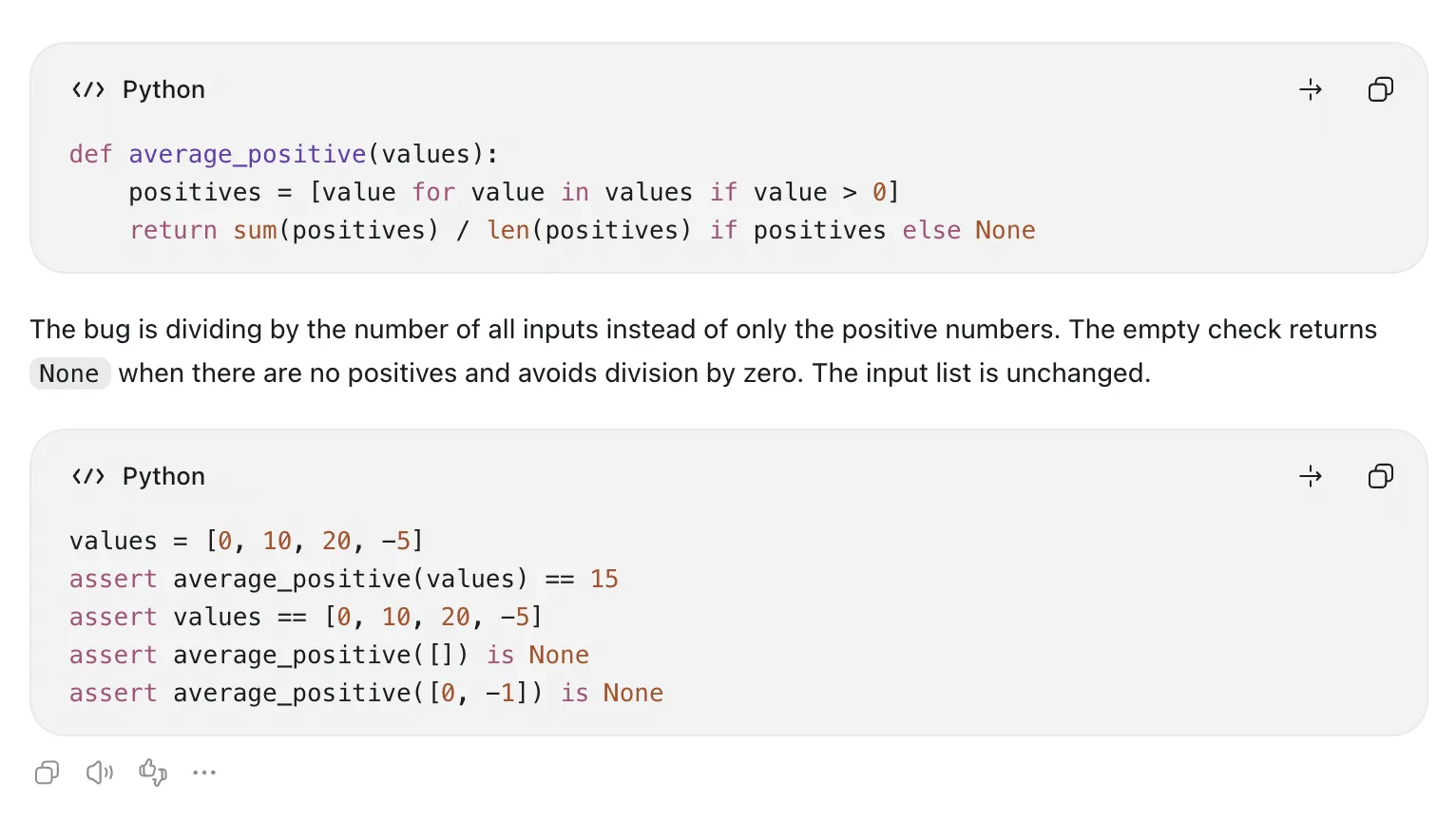
Fix the below Python function to return the average of positive numbers only or None for only non-positive. Don´t touch the input list. Explain the bug briefly and show tests for [0, 10, 20, -5], an empty list, and [0, -1]. Keep the fix small.
Original Code:
def average_positive(values):
*positives = [value for value in values if value > 0]*

*return sum(positives) / len(values)*
Claude
Screenshot: Claude (Anthropic)
ChatGPT
Screenshot: ChatGPT (OpenAI)
Winner: Tie. Both models spotted that the function divided by len(values) when it should divide by len(positives). Both handled the zero-division case cleanly and wrote assertion tests that passed for all three inputs.
9. Make a diagram you can use
Visual tools have to produce clean, readable diagrams that don’t need hand editing afterward (Anthropic, 2026; OpenAI, 2026).
Prompt:
Create a simple diagram for a training handout. Show three boxes abelled Brief, Draft, and Review, in that order, with arrows between them and a feedback arrow from Review to Draft. Use a white background and readable dark text. Include no logos, people, or decorative photos. Give me a downloadable PNG; if that isn’t available, provide a complete SVG file and explain how to view it.
Claude
Screenshots: Claude (Anthropic)
ChatGPT
Screenshot: ChatGPT (OpenAI)
Winner: Claude. Claude used its file-creation sandbox to write clean SVG code and then rendered a high-resolution 2400x880 PNG for download. ChatGPT made a usable image through Python, but Claude handed over both the raw vector source and the finished raster file.
10. Brainstorm business ideas with a small experiment
Useful brainstorming needs a concrete customer, a cheap way to test demand, and clear rules for when to stop.
Prompt:
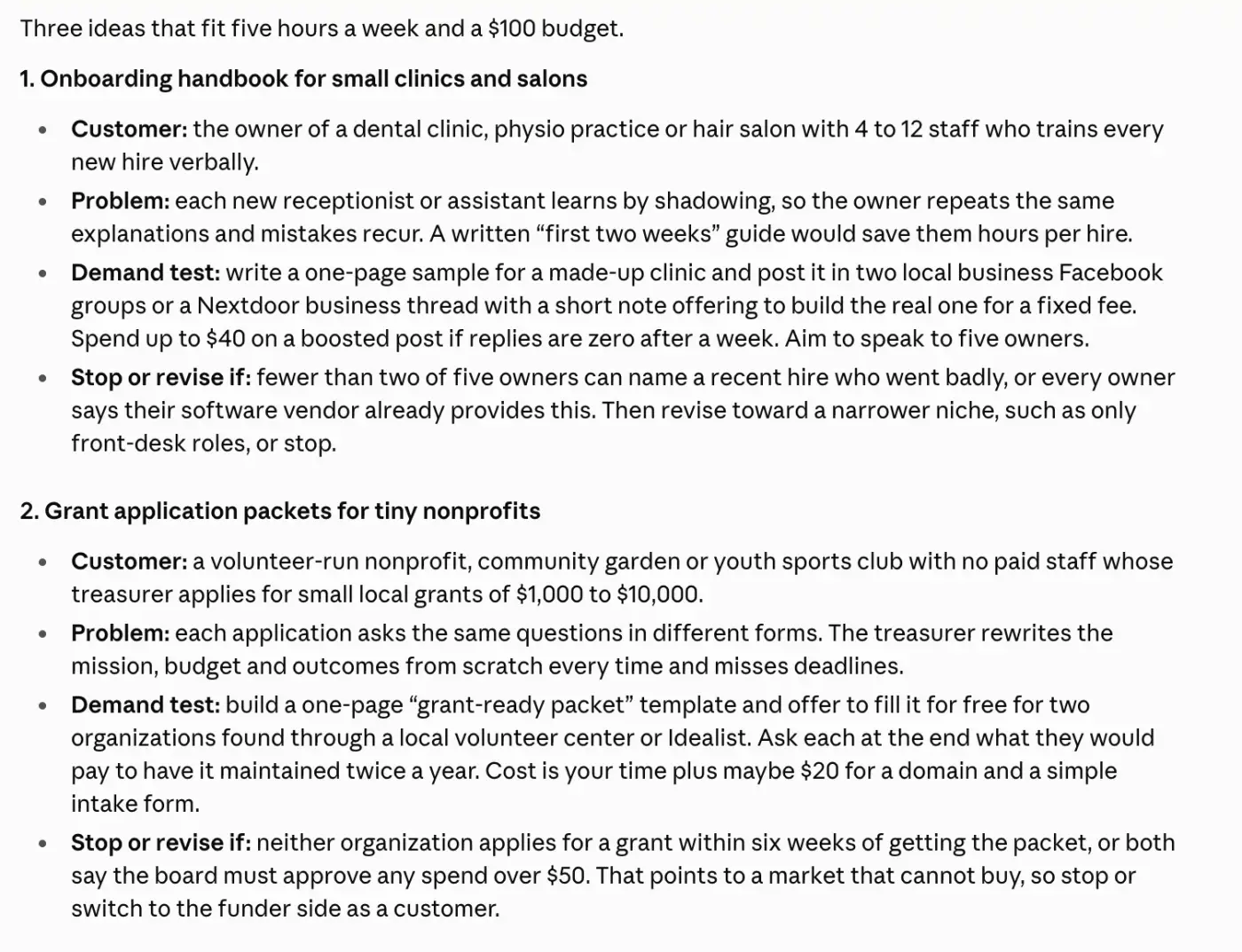
Suggest three small service-business ideas for someone who can organize information and write clear instructions. I have five hours a week and $100 for initial experiments. For each idea, name a specific customer, the problem, one low-cost way to test demand, and what result would make me stop or revise it. Don’t promise income or assume I already have customers.
Claude
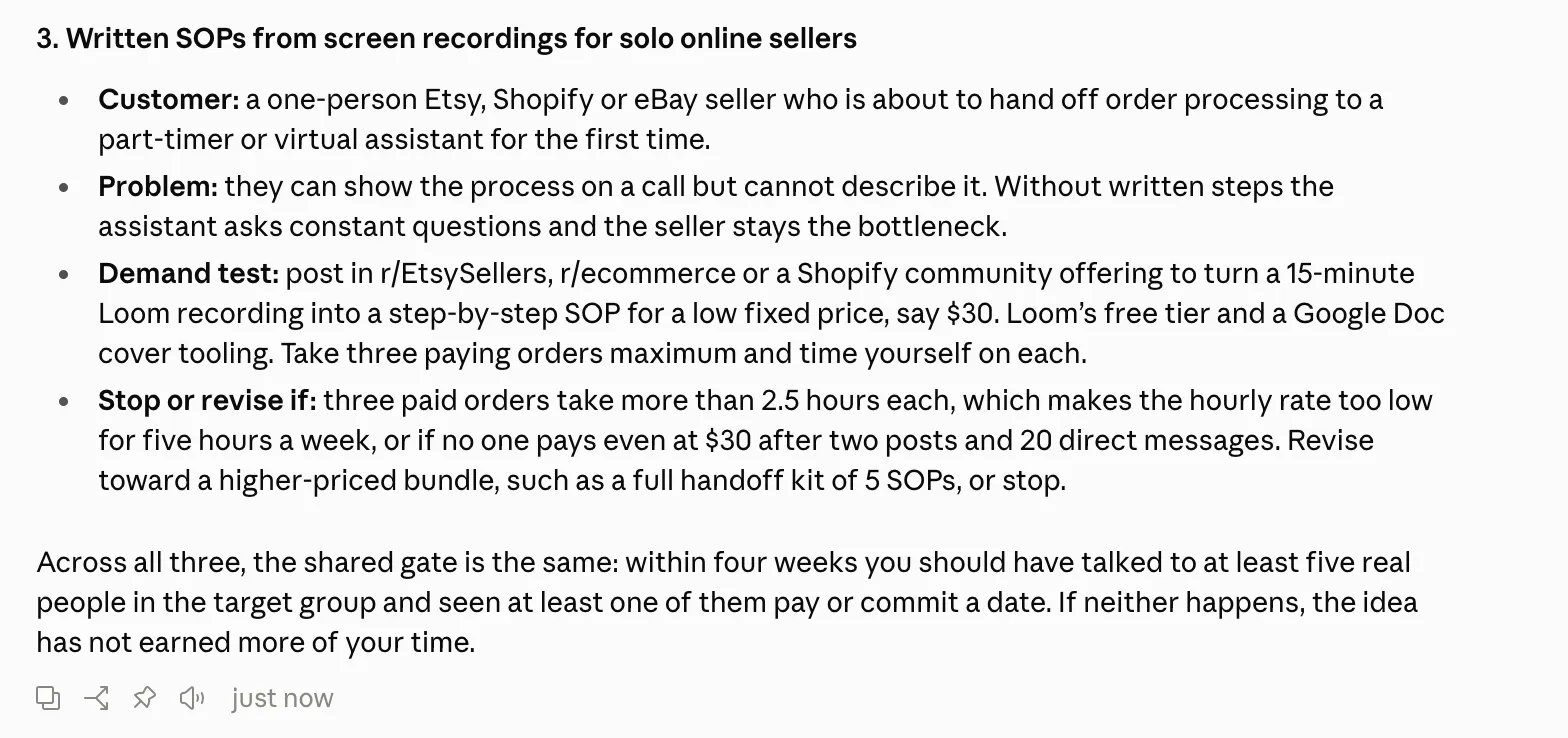
Screenshots: Claude (Anthropic)
ChatGPT
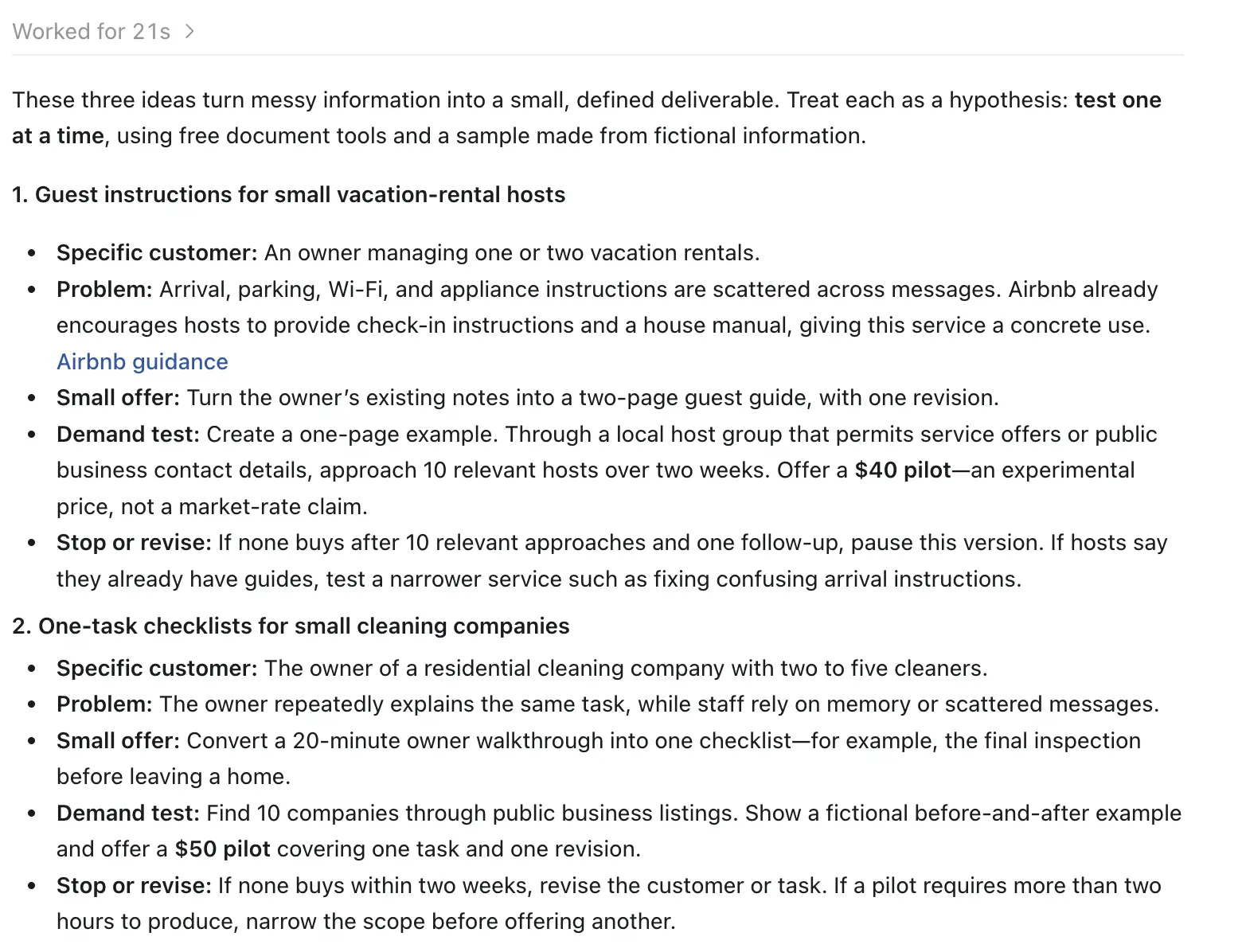
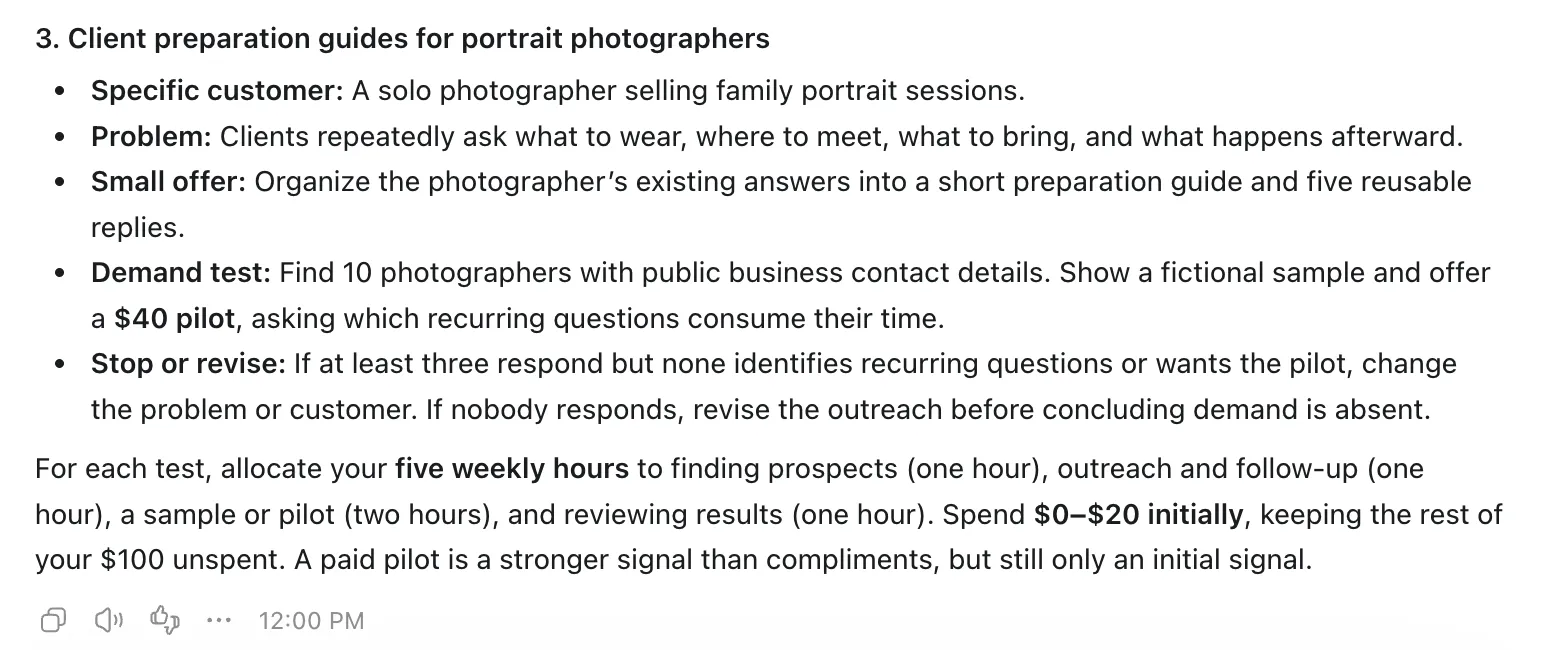
Screenshots: ChatGPT (OpenAI)
Winner: Claude. Claude described three service niches (small clinic onboarding handbooks, nonprofit grant packets, solo seller SOPs) and attached firm numeric stop rules to each. One example: abandon the test if a sample SOP takes longer than 2.5 hours to produce.
Free plans: try your actual workload first
Both platforms have free tiers that do more than basic text chat:
ChatGPT Free: Gives you standard web search, file uploads, data analysis, and a limited number of daily images through ChatGPT Images (OpenAI, 2026).
Claude Free: Includes web search, document uploads, file-creation tools, memory features, and desktop connectors, all under usage limits that shift with demand (Anthropic, 2026).
When you try a free version, watch whether you can finish a task you do regularly before you run into the message cap. Free allowances change with system demand and model updates, so they won’t stay the same.
Paid plans: Claude Pro vs ChatGPT Plus
For an individual professional, both main subscriptions start at the same price. They differ in which models you get and how flexible the billing is (Anthropic, 2026; OpenAI, 2026).
| Detail | Claude Pro | ChatGPT Plus |
|---|---|---|
| Monthly price | $20/month | $20/month |
| Annual option | $200/year upfront | No annual discount documented |
| Included models | Sonnet 5.5, Opus 5.5, Fable 5.1 (for extra credits only) | GPT-6 Sol, GPT-6 Astra effort mode |
| Usage limits | Session and weekly message allowances | Dynamic tool and model rate limits |
For a closer look at where each subscription draws its lines, read our ChatGPT Plus vs Claude Pro comparison. If you need team licenses or developer API costs, our Claude pricing guide covers them.
Privacy: check training, memory, and retention separately
Data controls work differently on personal accounts than they do in managed enterprise setups (Anthropic, 2026; OpenAI, 2026).
Model training opt-outs
ChatGPT: Go to Settings → Data Controls and switch off Improve the model for everyone. New chats are then left out of training runs.
Claude: Go to Settings → Privacy and turn off Help Improve our AI models.
Temporary chats and incognito modes
ChatGPT Temporary Chat: Keeps the conversation out of your chat history and out of model training. Copies may be stored for up to 30 days for safety review.
Claude Incognito: Turns off persistent memory, chat history, and model training. Logs are kept for 30 days for compliance audits.
Managed business tiers (OpenAI Enterprise and Claude Team/Enterprise) switch model training off by default for every team conversation.
For the full picture on enterprise data protection, see our Claude safety guide.
When using both has a clear purpose
Using both assistants can make sense for specialized workflows.
One common pattern: use ChatGPT for web search and gathering data, then pass the structured notes to Claude for drafting and document design.
Developer Simon Willison showed a two-model workflow in which GPT-6 Astra produced the first system profiling reports and he handed that output to Claude Opus 5.5 for code refactoring (Willison, 2026).
It works well for complex technical jobs. Still, two paid subscriptions only make sense if your daily volume justifies the cost.
Build the habit of briefing and checking AI
Whichever assistant you use, the best way to get good results is to run your most frequent task through both tools with identical prompts. Then compare the quality, the factual accuracy, and how much editing each answer needs.
To build prompting skills in a structured way, try Coursiv’s 28-Day AI Certificate Program. The lessons are practical and step by step, and they cover ChatGPT, Claude, and other leading AI platforms. You can also look over the AI Certificate Program overview to see the curriculum and the certificate options before you enroll.
If your work leans on Google’s apps, widen the comparison with our guides to Claude vs Gemini and Gemini vs ChatGPT, plus our roundup of the best AI chatbots.
ChatGPT and OpenAI are trademarks of OpenAI. This article is independent and is not affiliated with or endorsed by OpenAI. Claude is a trademark of Anthropic. This article is independent and is not affiliated with or endorsed by Anthropic.