Your workplace gives you Microsoft Copilot, and you already use ChatGPT at home. Copilot is not the same as ChatGPT: Microsoft builds its own assistant with models from OpenAI, Microsoft and other developers; ChatGPT is OpenAI’s assistant.
Which to choose:
- Microsoft 365 Copilot: when your employer provides the license and access you need to work with files, emails and meetings inside Microsoft 365.
- ChatGPT: when research and standalone tasks matter more; it had a narrow lead on answer quality in my tests.
- Both: when each improves a different recurring task and your employer permits the handoff.
Below: 8 differences side by side, the same 6 tasks run on both, and a quick way to decide.
Key terms used in this guide: copilot and large language model.
Is Copilot the same as ChatGPT?
No. ChatGPT is a different product than Microsoft Copilot. Copilot uses AI models from Microsoft and from OpenAI (the same company behind ChatGPT) and other developers. There’s some overlap in the underlying technology, but the two assistants have different tools, integrations, and account settings.
Which Copilot am I comparing?
This comparison focuses on Microsoft 365 Copilot and ChatGPT for everyday work. The practical tests used a Microsoft 365 Personal subscription; business features are compared from documentation. Here are the key differences between the Copilot products:
| Name | What it means here | Relevant comparison |
|---|---|---|
| Microsoft 365 Copilot | Work experiences with different Basic/Premium entitlements and organization controls | Microsoft Word, Microsoft Excel, Microsoft Outlook, Microsoft Teams and permitted work context |
| Microsoft Copilot | The personal-account assistant, with free and subscription-based access | Everyday questions, writing, research, images and voice |
| GitHub Copilot | A software-development assistant | Code, repositories and developer workflows |
Our Microsoft 365 Copilot setup guide covers the starting workflow.
Microsoft Copilot vs ChatGPT: eight key differences
Last verified: October 23, 2026.
| Difference | Microsoft Copilot and Microsoft 365 Copilot | ChatGPT |
|---|---|---|
| Models | Models from Microsoft, OpenAI and other developers; availability varies by app and license | GPT-6, GPT-6 Pro, GPT-5.6 Sol and GPT-5.6 Luna; availability varies by plan |
| Where it works | Web, desktop, mobile and supported Microsoft 365 apps | Standard ChatGPT: web, desktop and mobile. Separate add-ins run inside Microsoft Word and Microsoft Excel |
| Free access | Limited personal assistant; eligible work subscriptions include baseline chat | Free includes search, uploads, analysis and image creation with limits |
| Paid plans | Microsoft 365 personal and business plans; some business agents and services are billed separately by usage | Go, Plus, three Pro tiers, Business seats and institutional contracts |
| Office integration | Licensed in-app help and permitted organizational context through Microsoft services | Separate Microsoft Word and Microsoft Excel add-ins; Microsoft Outlook and Microsoft SharePoint connections through apps in ChatGPT, subject to account and administrator permissions |
| Web search and sources | Web-grounded answers and citations | Search with citations and a Sources view; free access also supported |
| Images and voice | Image generation and voice conversations are available in free Microsoft Copilot, subject to usage limits. Paid plans offer higher allowances | Image generation and voice conversations are available on ChatGPT Free, with separate usage limits. Paid plans offer higher allowances |
| Privacy and administration | New personal-app rules differ from legacy guidance; work accounts have enterprise protections | Personal training controls differ from Business/Enterprise defaults and admin features |
6 tasks to compare with the same prompts
I ran six paired tests on the same day, using the same prompts and fictional source material. The screenshots below show the responses, and each task explains what I checked. Based on the visible outputs, ChatGPT won the research task and had a provisional edge in Excel; the other four tasks were ties.
I score each response on accuracy, completeness, instruction following and usability: 0 for failing a requirement, 1 for partly meeting it and 2 for meeting it, up to 8 points per response. I flag serious factual errors separately. I compare quality scores alongside correction effort and workflow steps. Equal results can be a draw. Quality and workflow can have different winners.
Test scope: I tested Copilot with a Microsoft 365 Personal subscription vs ChatGPT Plus. I used Microsoft Word and Microsoft Excel in a browser for the Copilot tasks. The email task compared replies in standalone chats. I used Think Deeper in Copilot and GPT-6 High in ChatGPT.
If you are considering Plus, our ChatGPT Plus value guide helps frame the upgrade decision.
The review separates answer quality from the steps needed to use the result. This personal-plan test does not establish the behavior of Microsoft 365 Copilot business accounts, organizational data access or administrator controls. The screenshots illustrate these runs, not a benchmark or a universal performance ranking.
1. Draft a reply to a workplace email
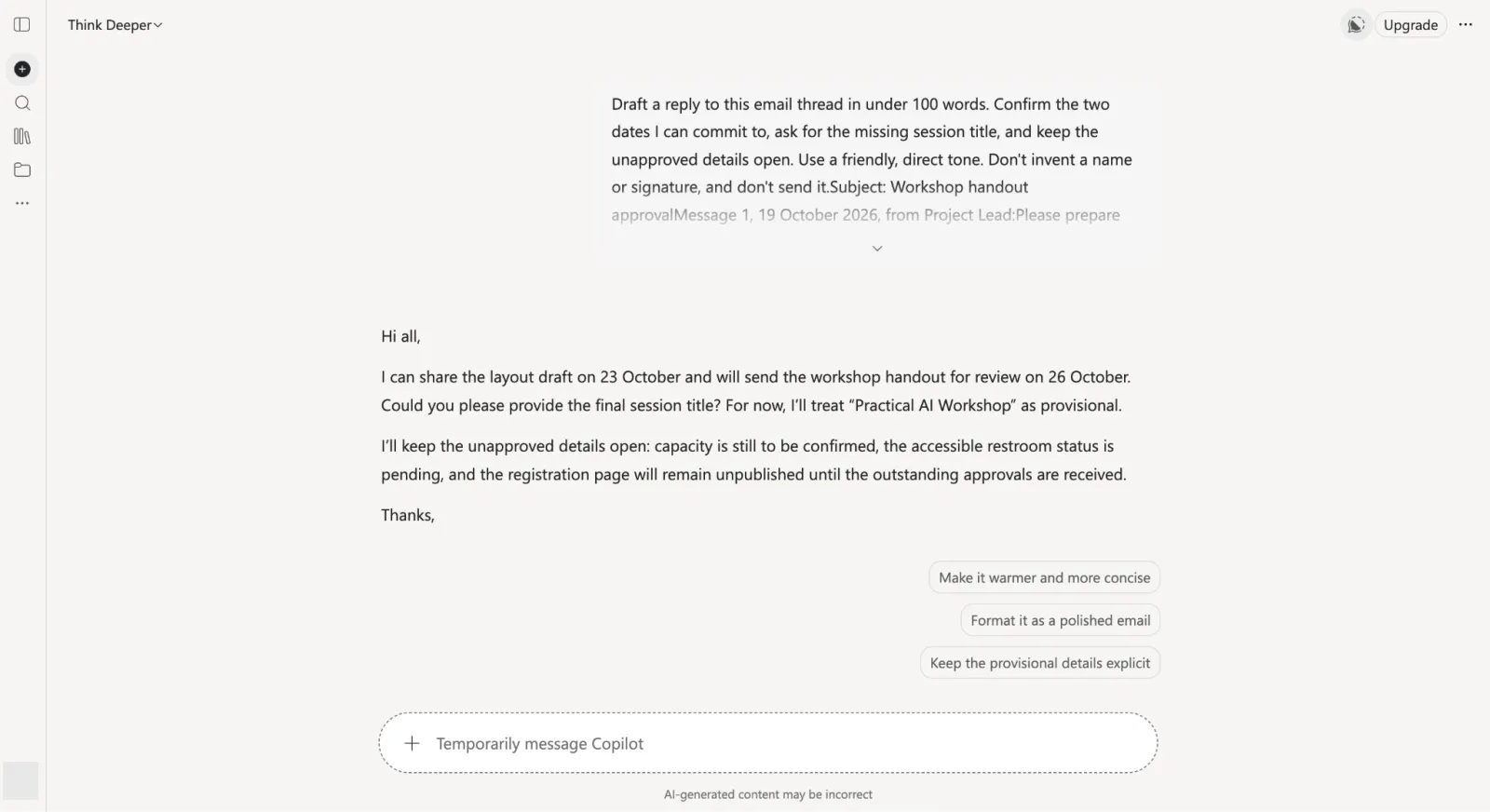
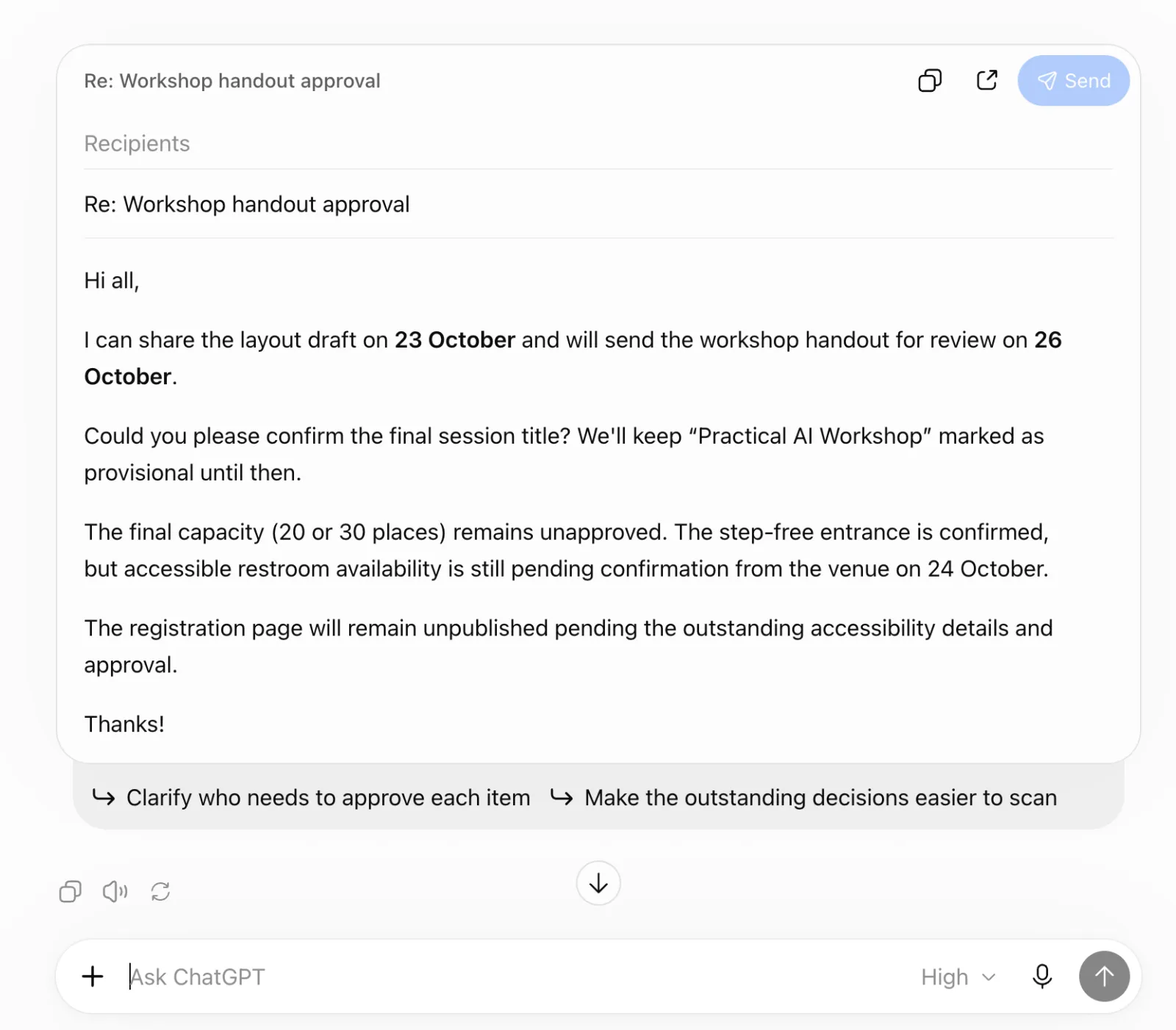
I gave both assistants the fictional workshop thread and the same reply facts. I checked whether they could draft a useful response without turning unresolved details into commitments.
Draft a reply to this email thread in under 100 words. Confirm the two dates I can commit to, ask for the missing session title, and keep the unapproved details open. Use a friendly, direct tone. Don’t invent a name or signature, and don’t send it.
By the way, you can try the same prompt right in Outlook. Our Copilot in Microsoft Outlook guide covers that workflow.
Copilot
Screenshot: Microsoft Copilot. Used with permission from Microsoft.
ChatGPT
Screenshot: ChatGPT (OpenAI)
Both replies stayed under 100 words, confirmed the October 23 and October 26 commitments, and asked for the final session title. Neither turned the unresolved capacity, restroom or publication details into a promise.
Winner: Tie.
2. Summarize a Microsoft Word document
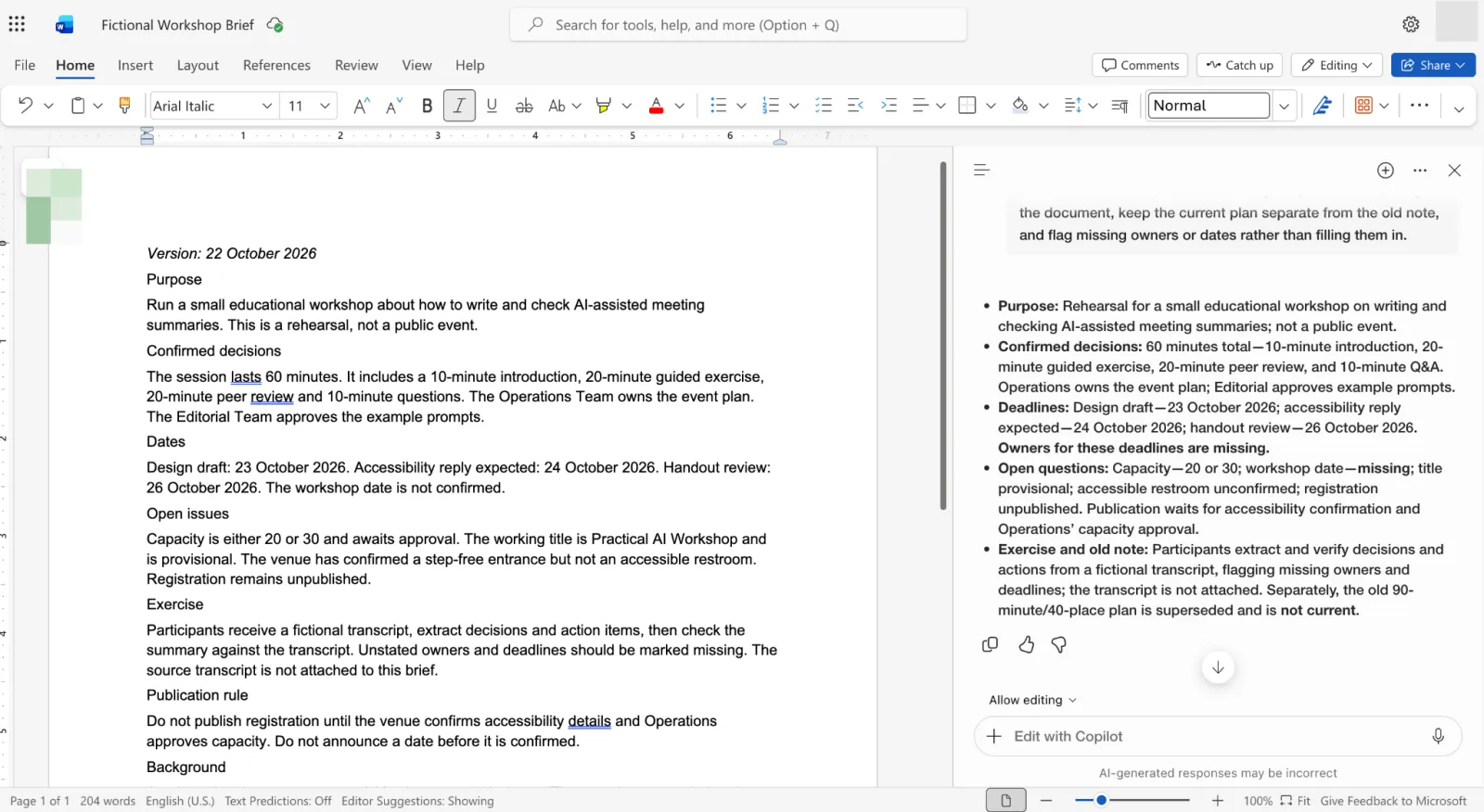
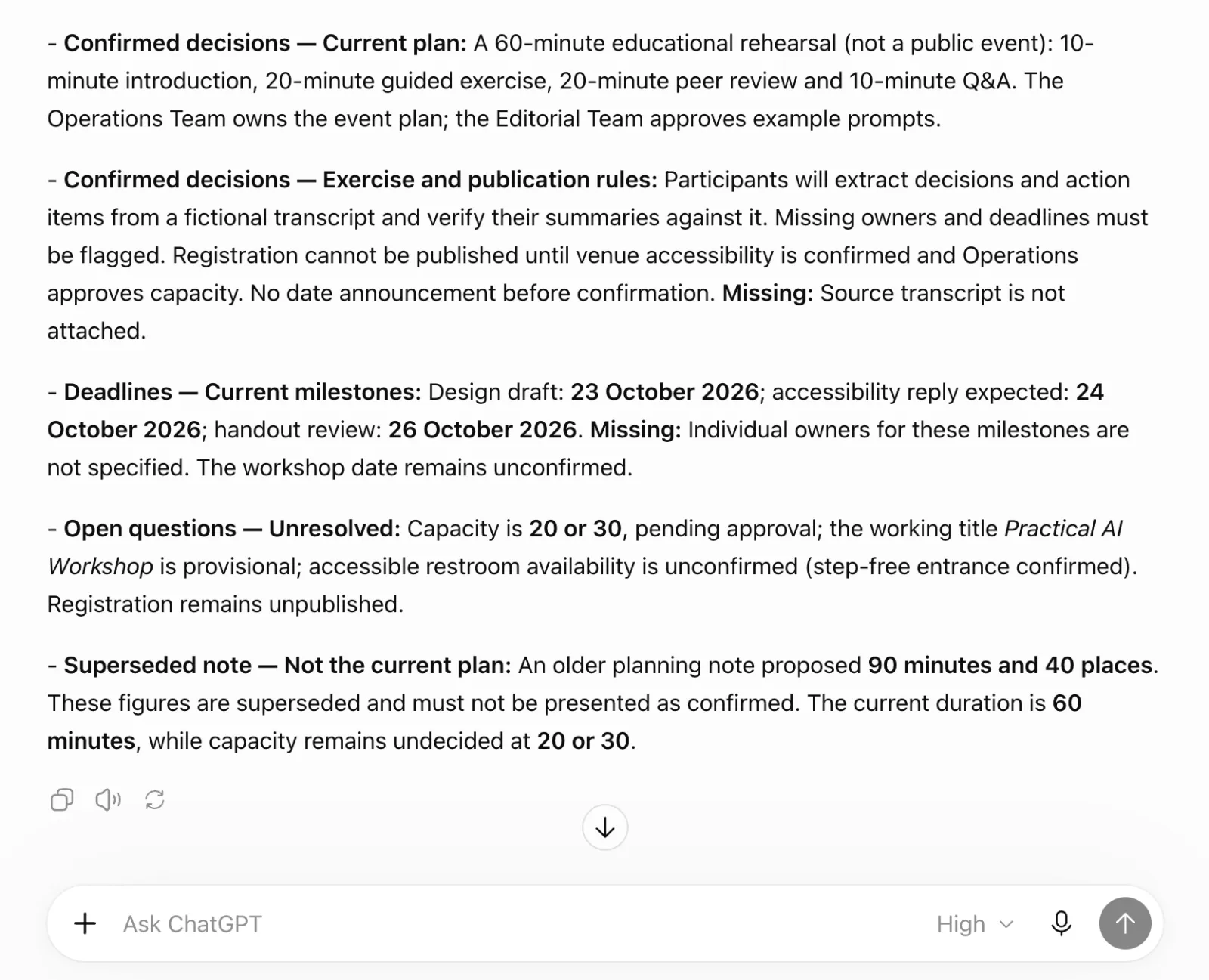
I used a fictional workshop brief to check whether each assistant could separate confirmed decisions, deadlines and open questions in five bullets.
Summarize this workshop brief in five bullets. Separate confirmed decisions, deadlines and open questions. Use only the document, keep the current plan separate from the old note, and flag missing owners or dates rather than filling them in.
The Copilot in Microsoft Word guide covers document summaries in more detail.
Copilot
Screenshot: Microsoft Word. Used with permission from Microsoft.
ChatGPT
Screenshot: ChatGPT (OpenAI)
Neither output worked well as a summary for me: both felt almost as long as the original document. They separated the current plan from the old note and flagged missing information, but I would need a much shorter version to save reading time.
Winner: Tie; neither produced a concise enough summary.
3. Analyze data in Microsoft Excel
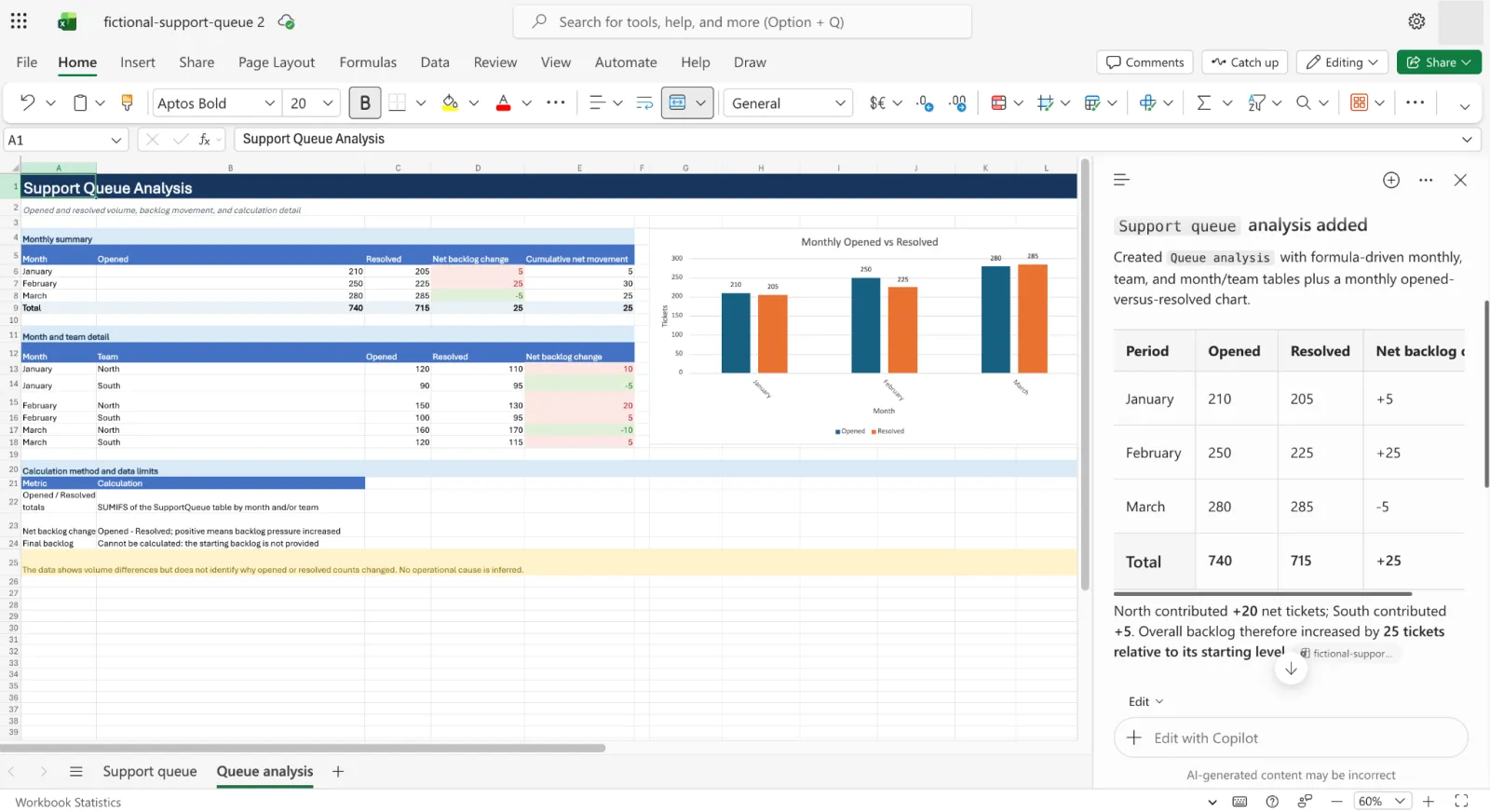
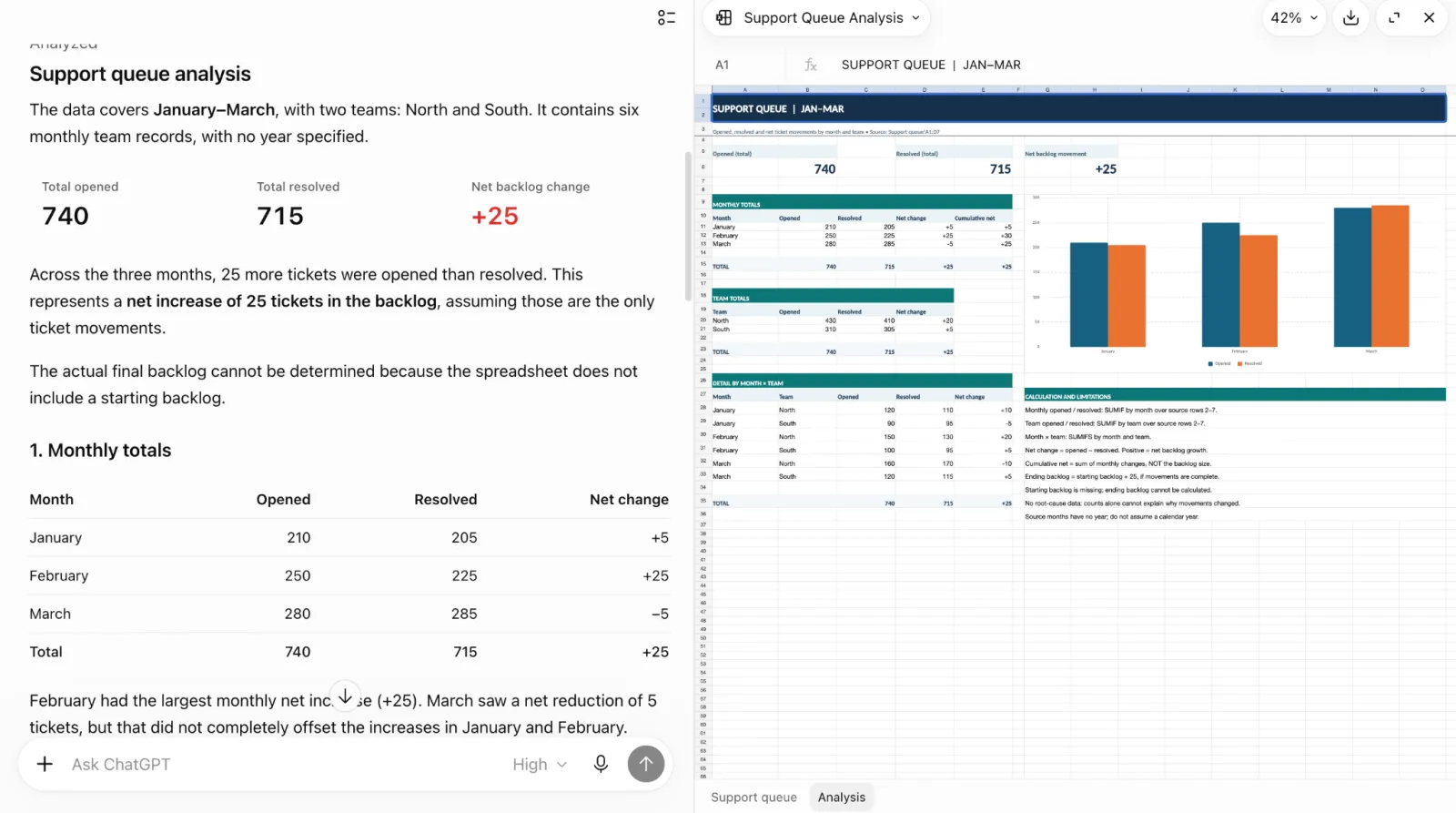
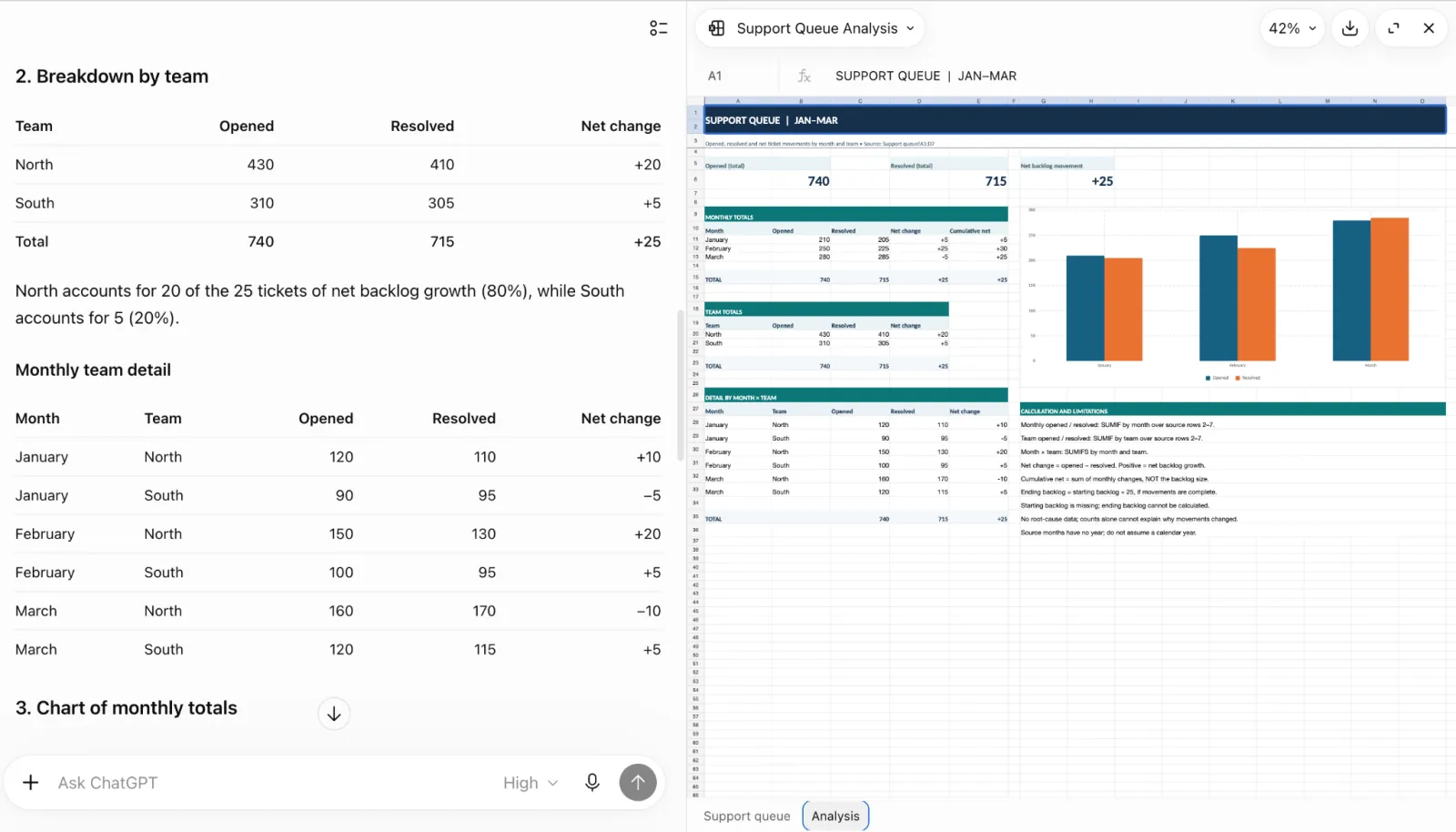
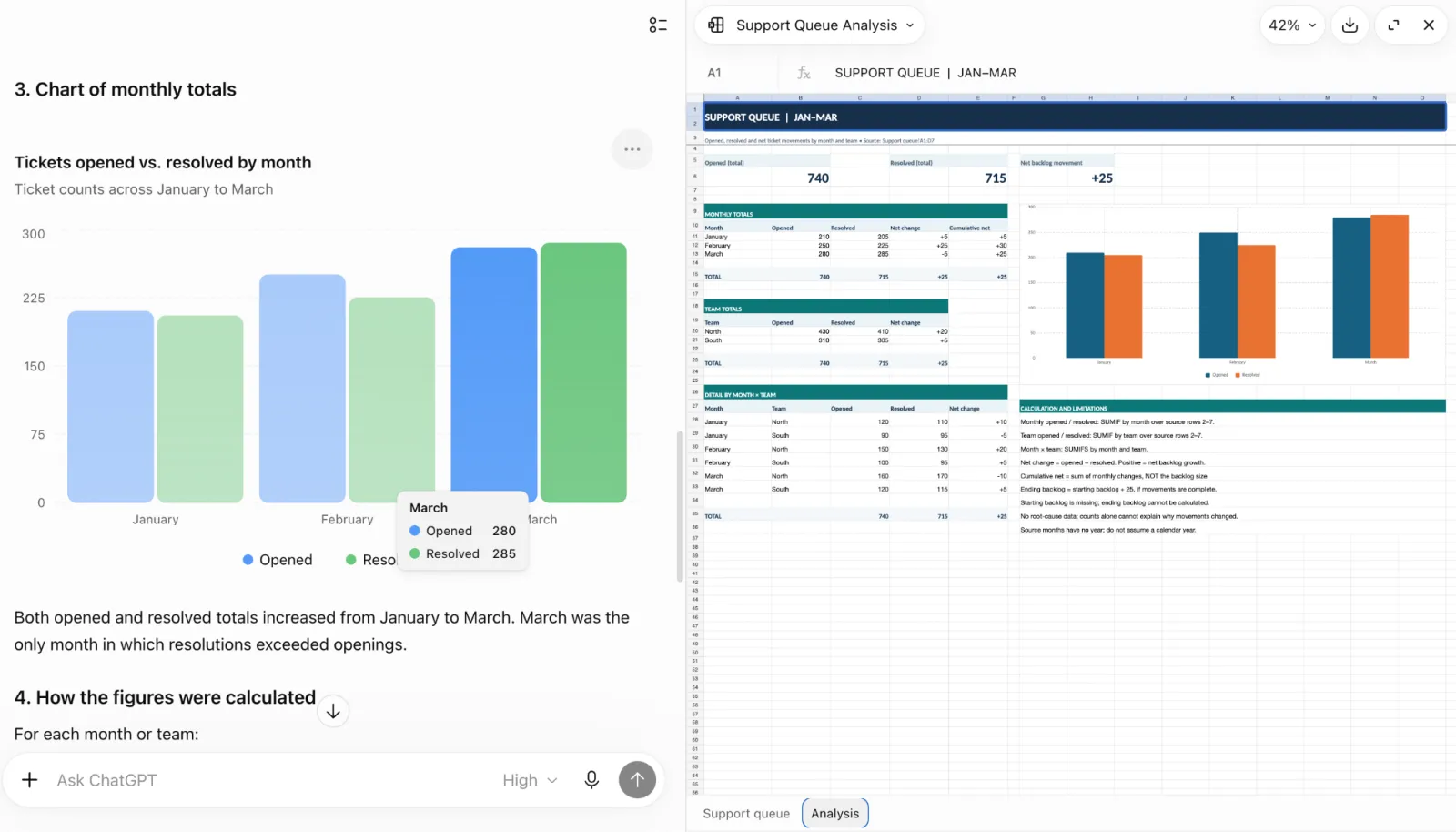
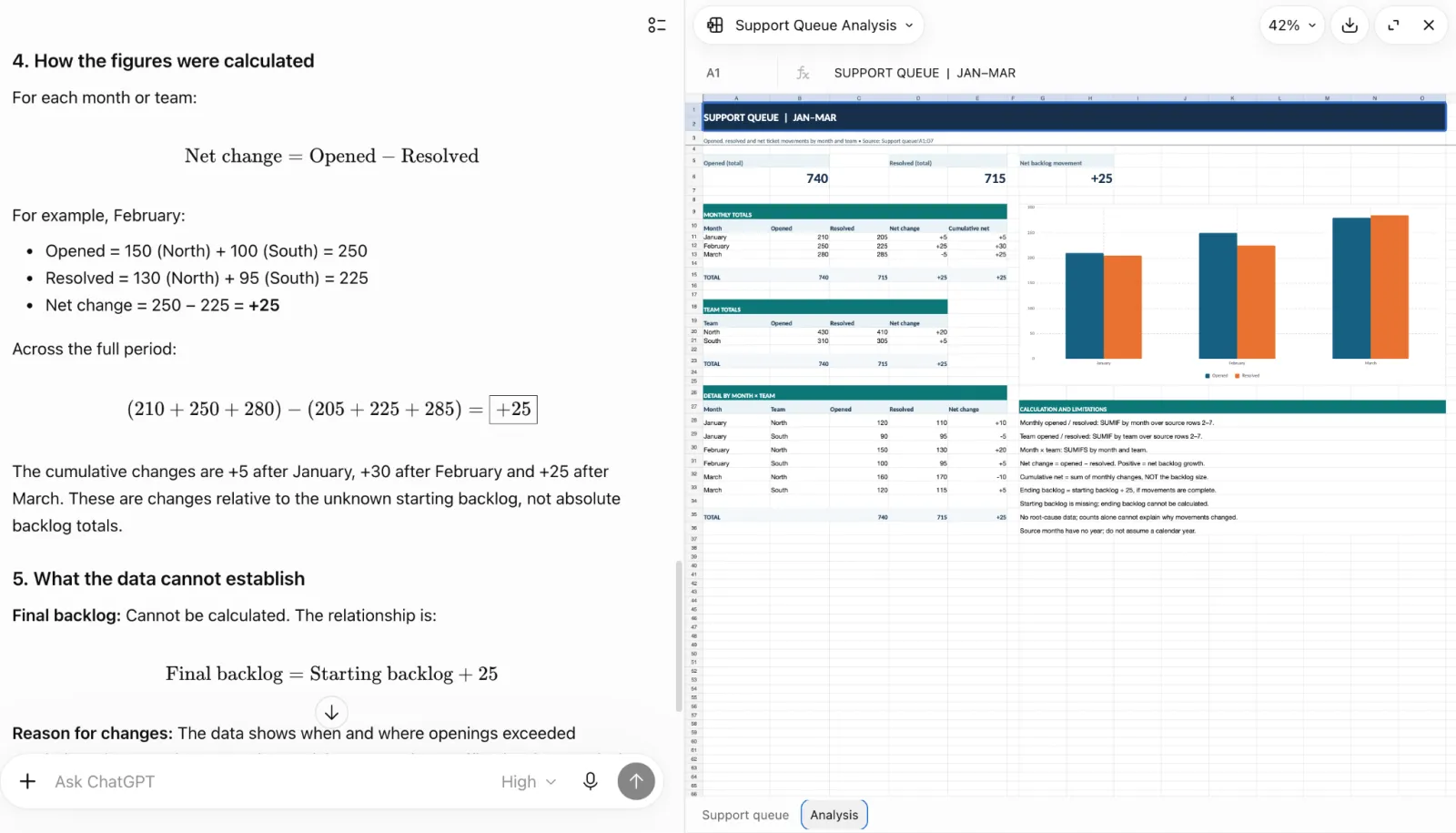
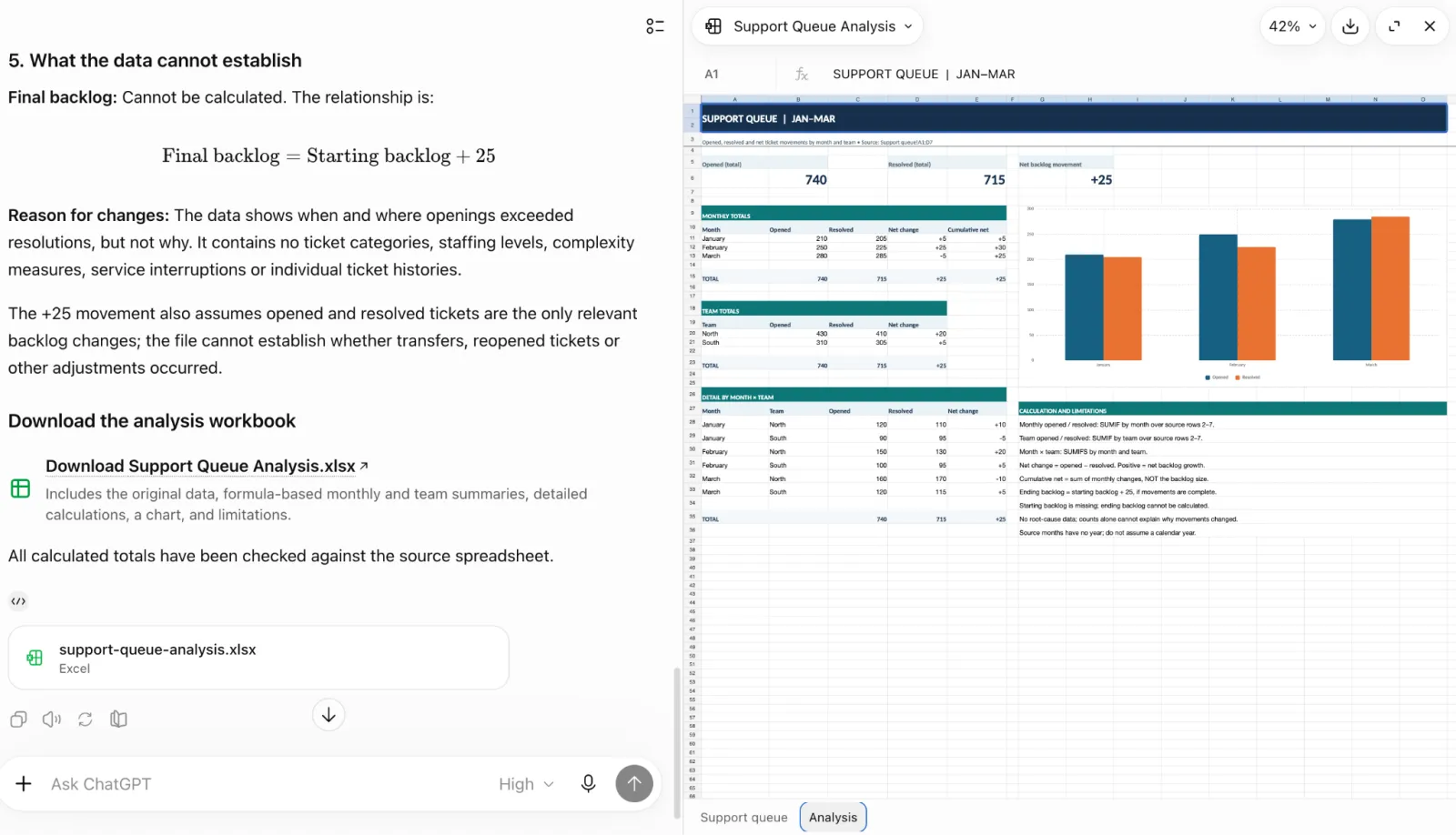
I used the same six support-queue rows to check monthly and team calculations, a chart of monthly totals, and a reproducible explanation of the figures.
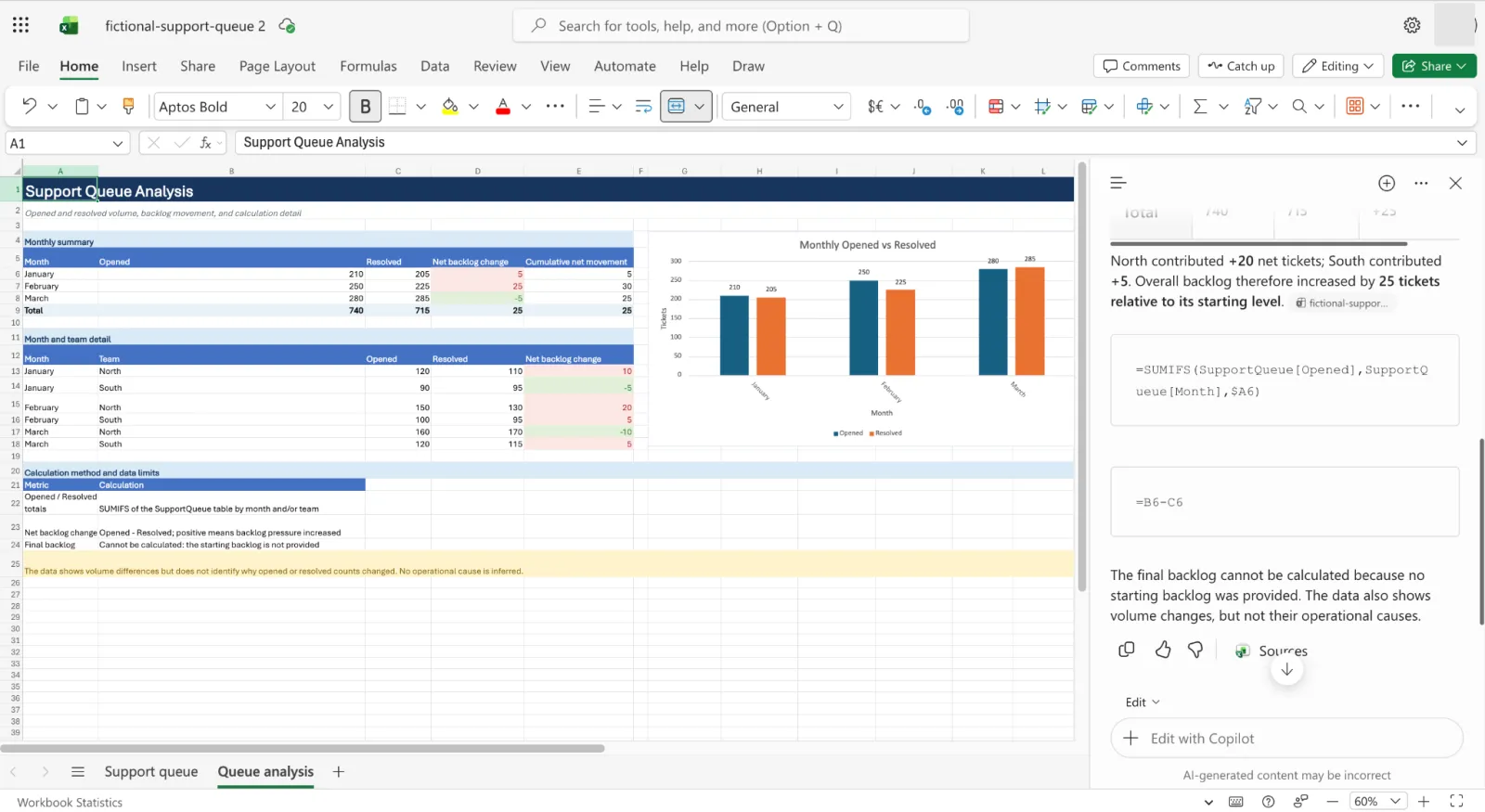
Analyze this support queue by month and team. Show opened and resolved totals, the net change in backlog, and a chart of monthly totals. Show how you calculated the figures. If the data can’t tell you the final backlog or explain a change, say so rather than guessing.
For more on using Copilot with spreadsheets, see our Copilot in Microsoft Excel guide.
Copilot
Screenshot: Microsoft Excel. Used with permission from Microsoft.
Screenshot: Microsoft Excel. Used with permission from Microsoft.
ChatGPT
Screenshot: ChatGPT (OpenAI)
Screenshot: ChatGPT (OpenAI)
Screenshot: ChatGPT (OpenAI)
Screenshot: ChatGPT (OpenAI)
Screenshot: ChatGPT (OpenAI)
ChatGPT gave a more complete analysis, including team totals. I found its explanations and visual presentation to be clearer and therefore easier to follow in terms of calculations and results. Both tools provided editable spreadsheet results: Copilot worked in the open Microsoft Excel workbook, while ChatGPT provided an editable workbook in the chat.
The screenshots alone do not establish whether every formula in the resulting workbooks is correct, so the quality verdict remains provisional.
Winner: ChatGPT (provisional).
4. Research a topic with sources
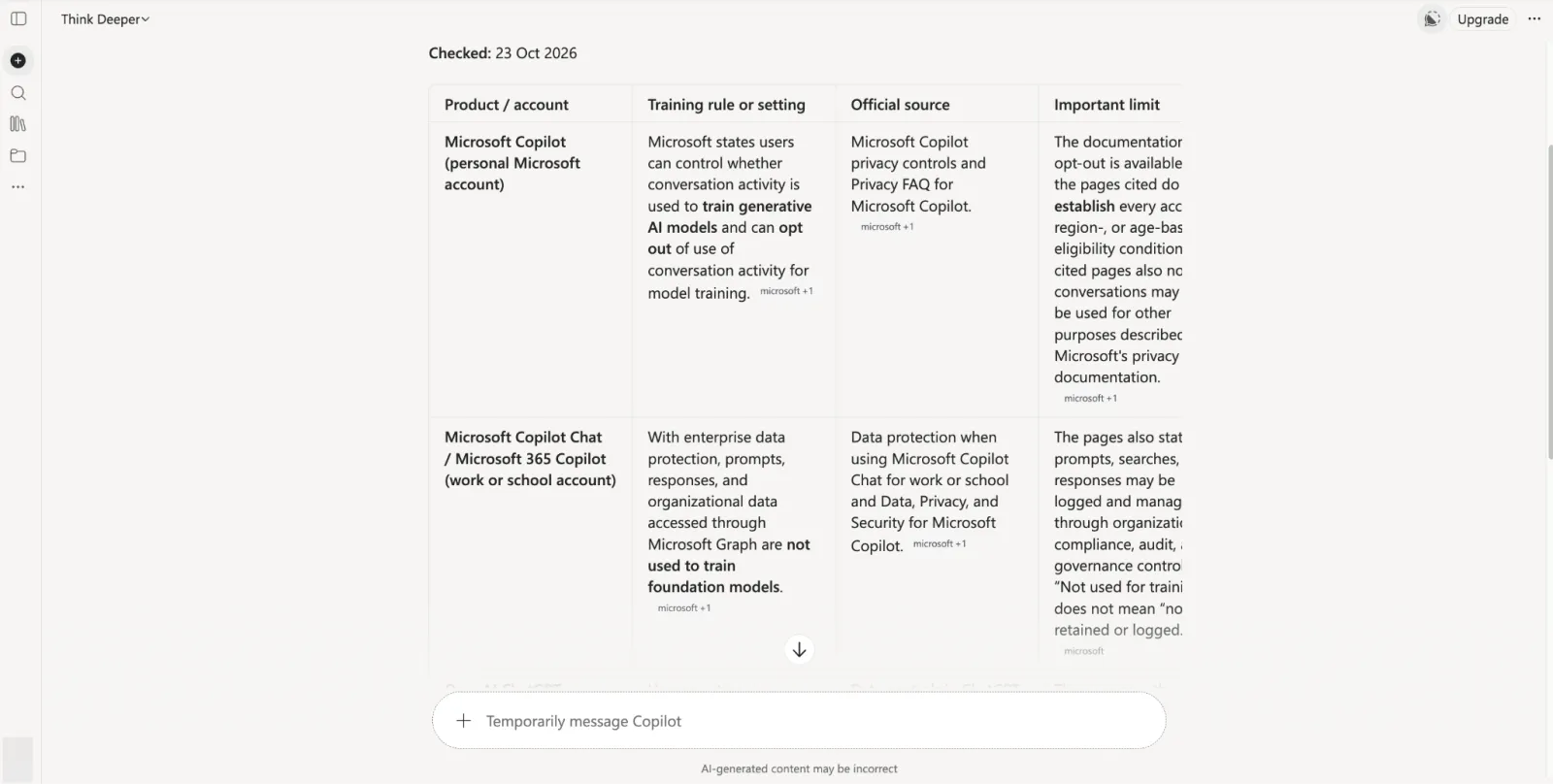
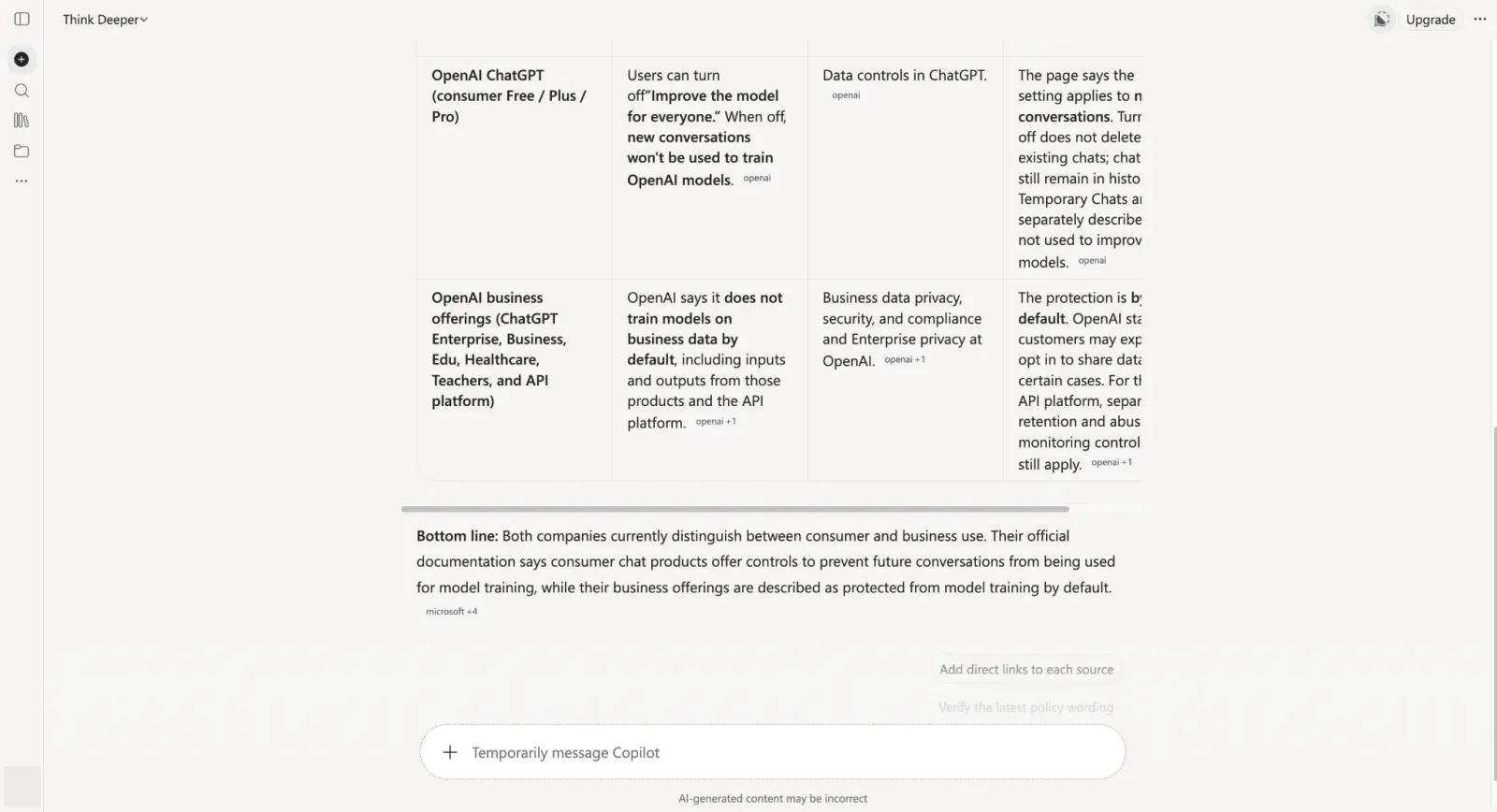
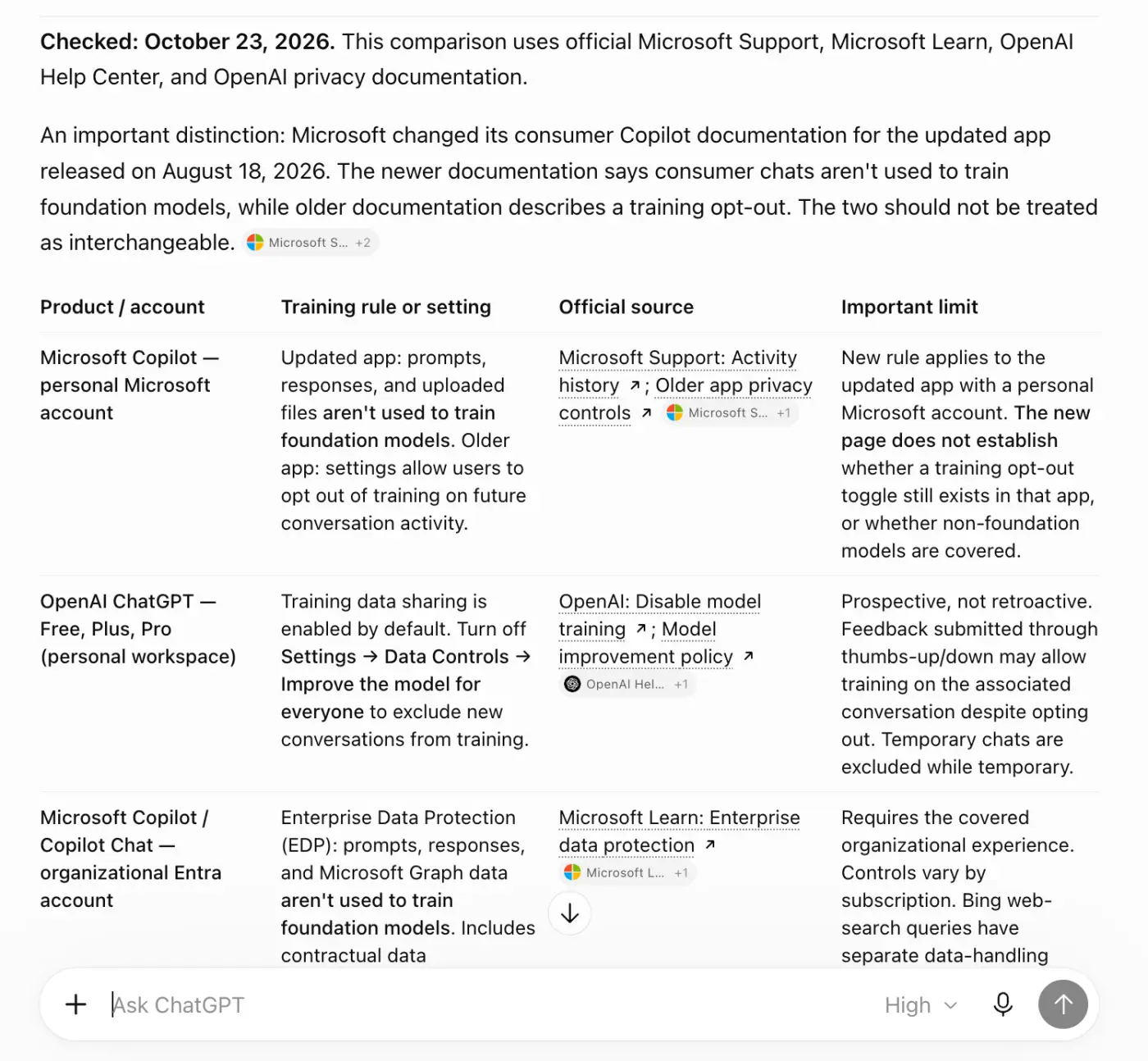
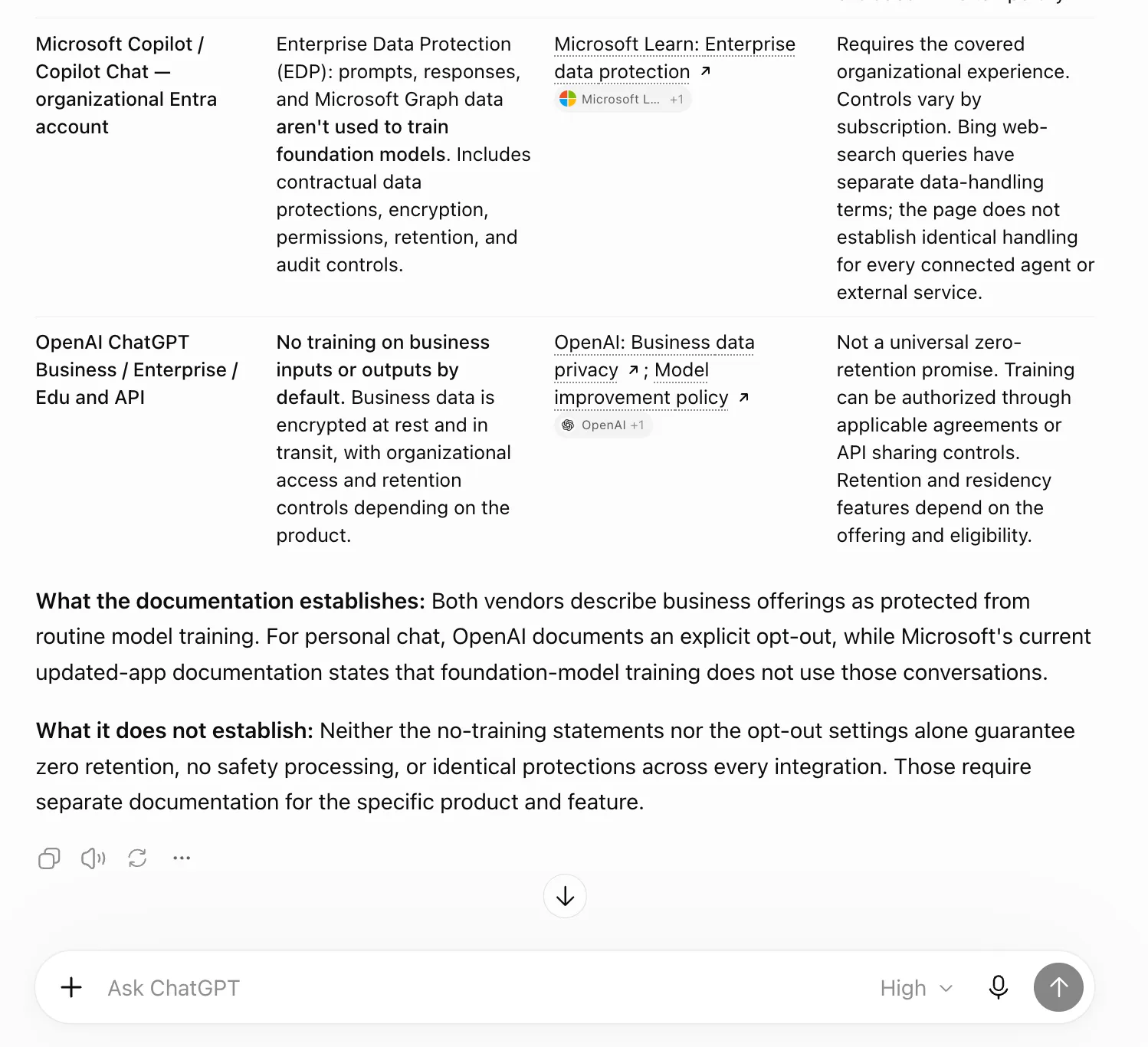
I checked whether each assistant could distinguish consumer training controls from business data protections and support its comparison with official documentation.
Compare how Microsoft and OpenAI currently describe consumer chat training controls and business data protections. Use their official documentation. Give me a four-row table with the product/account, the training rule or setting, a source and any important limit. Include the date you checked. Say when a page doesn’t establish the answer.
Copilot
Screenshot: Microsoft Copilot. Used with permission from Microsoft.
Screenshot: Microsoft Copilot. Used with permission from Microsoft.
ChatGPT
Screenshot: ChatGPT (OpenAI)
Screenshot: ChatGPT (OpenAI)
ChatGPT distinguished Microsoft’s current consumer privacy guidance from older opt-out instructions. Copilot presented older guidance as current, which changed the answer to the central question. ChatGPT’s response was therefore more useful for this research task.
Winner: ChatGPT.
5. Write a LinkedIn post
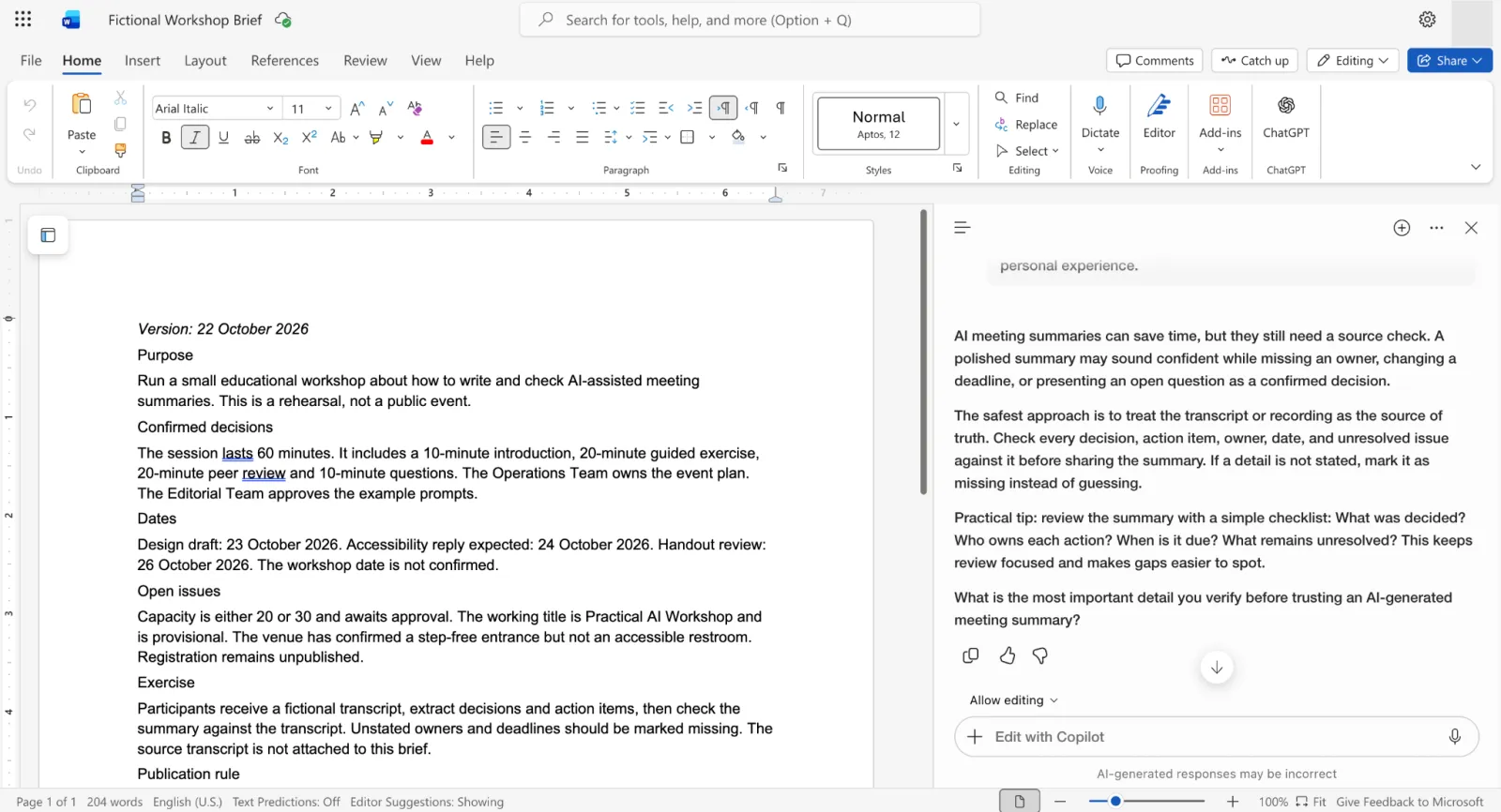
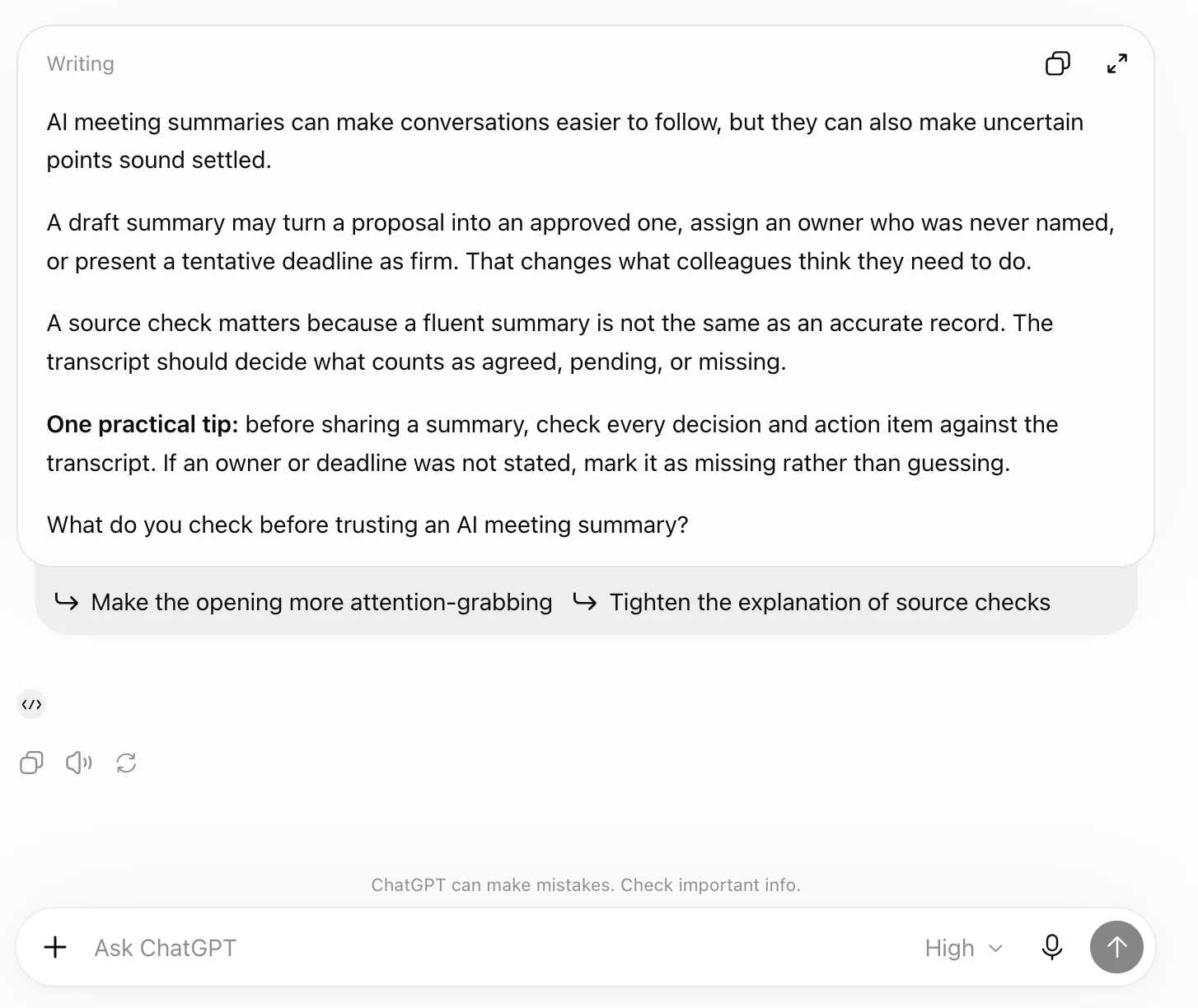
I reused the workshop brief to check whether each assistant could write a useful LinkedIn post without announcing the fictional event or inventing personal experience.
I checked factual fidelity, the requested 120-word length, plain professional tone, one practical tip and a useful closing question. The review also considers unsupported additions and the edits needed before use.
Turn this fictional workshop brief into a 120-word LinkedIn post about why AI meeting summaries need a source check. Give one practical tip and end with a useful question. Keep the tone plain and professional. Don’t announce the workshop, add statistics or invent personal experience.
Copilot
Screenshot: Microsoft Word. Used with permission from Microsoft.
ChatGPT
Screenshot: ChatGPT (OpenAI)
Both produced a plain, professional post with a practical tip and a closing question, without inventing personal experience or statistics. ChatGPT was closer to the requested word count, but I found no decisive difference in how useful the posts were.
I found editing the post easier in ChatGPT.
Winner: Tie for post quality; ChatGPT for editing convenience.
6. Create an image
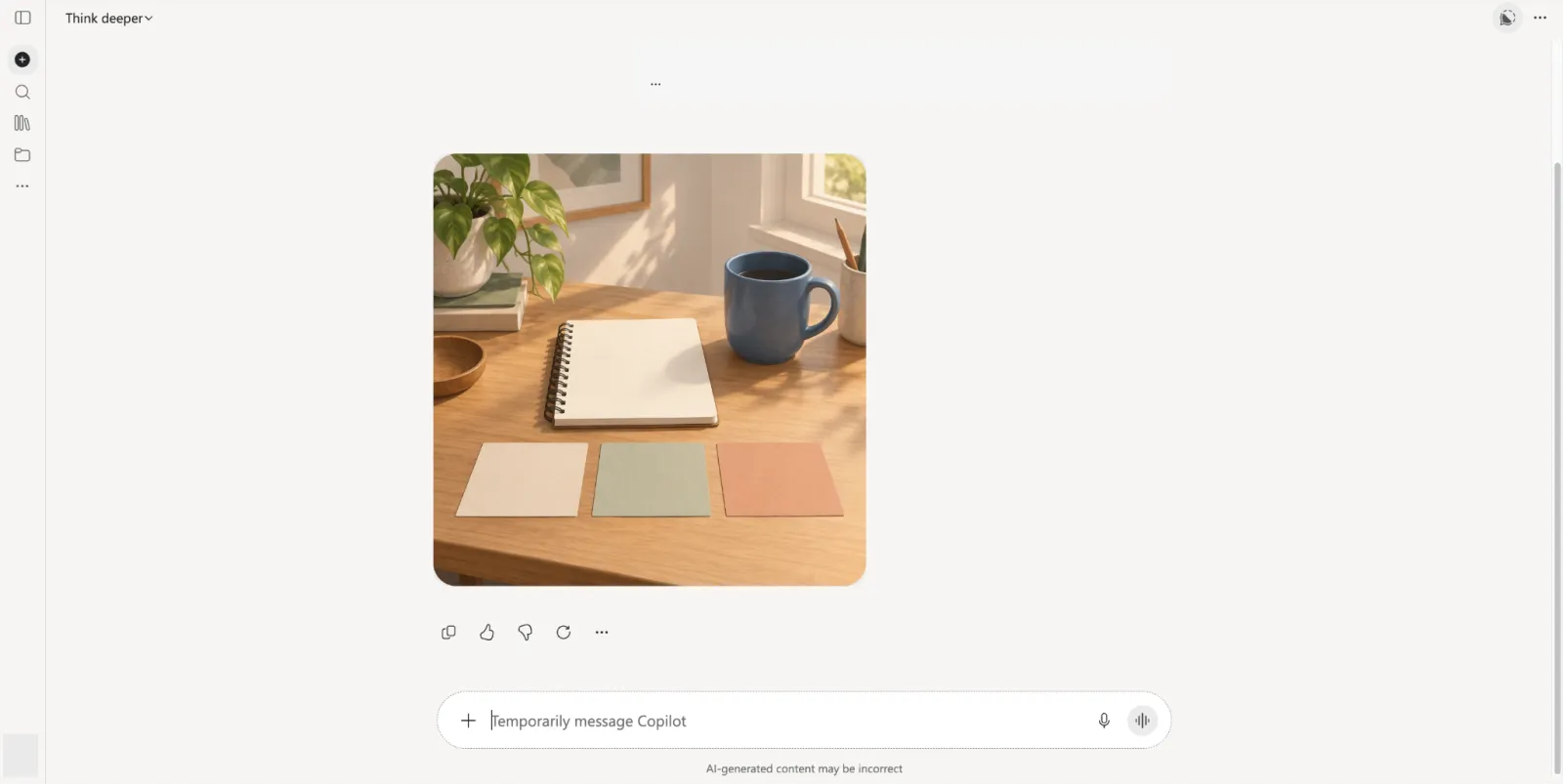
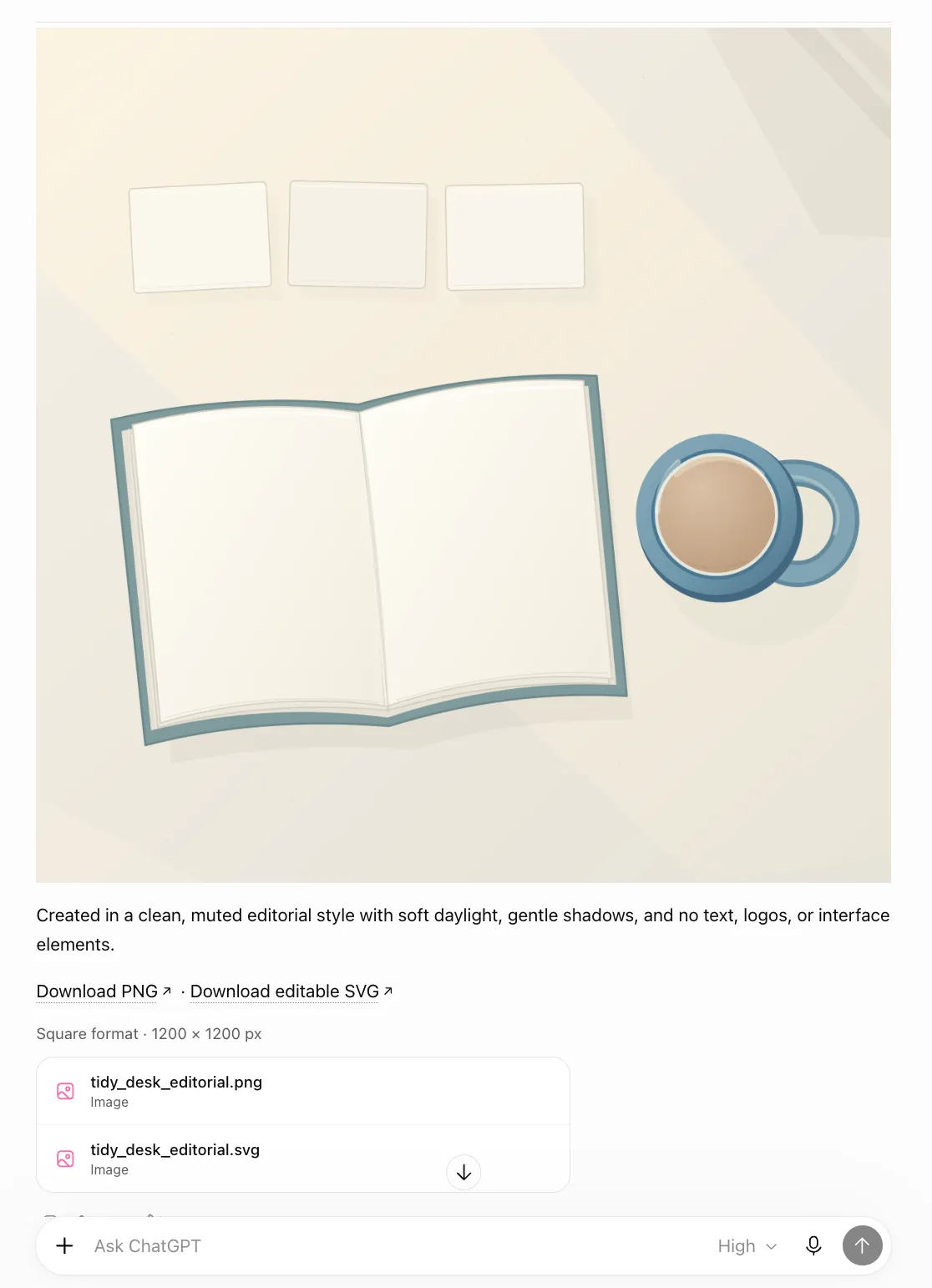
I used the same original desk scene to check how closely each image followed the requested objects, arrangement, lighting and exclusions.
Create a square editorial illustration of a tidy desk with a blank notebook, a blue mug and three simple paper cards arranged in a row. Use warm daylight and a clean, muted style. No people, logos, brands, readable text or interface elements.
Copilot
Screenshot: Microsoft Copilot. Used with permission from Microsoft.
ChatGPT
Screenshot: ChatGPT (OpenAI)
Both images included the blank notebook, blue mug and three paper cards, with a square composition and no people or readable text. Copilot’s image looked far more polished to me, but it also added details I had not requested. The better choice depends on how the image will be used.
ChatGPT also offered several image formats for download in my run, which was a practical advantage.
Winner: Tie on the main requirements; the better fit depends on the intended use.
General verdict: ChatGPT therefore had a narrow lead on answer quality in these runs.
Copilot vs ChatGPT for work in Microsoft 365
For work, check whether the assistant can use the right company sources. Ask IT which accounts, connections and actions are approved. Then try a recurring task with a source you can verify. Check that it finds the current file, preserves dates and owners, and reduces manual handoffs.
Check data handling separately. Microsoft 365 Copilot and ChatGPT Business/Enterprise exclude business prompts and responses from model training by default, but retention and administrator controls differ. Our workplace AI safety guide explains what to ask before connecting company information.
ChatGPT vs Copilot for students and personal use
If your school provides an AI account, check its rules for assignments before using it. Access to an assistant does not mean every form of AI help is permitted in your coursework.
Check the privacy settings on personal accounts. Microsoft’s policy for the Copilot app available from August 18, 2026 says prompts, responses and file contents are not used to train foundation models; older versions have separate guidance. For personal ChatGPT chats, turning off “Improve the model for everyone” excludes new conversations from training.
Our ChatGPT beginner guide explains how to write a prompt and review the response. If you mainly use Google apps, compare Gemini vs Copilot; our best AI chatbots guide covers a wider shortlist.
Copilot vs ChatGPT for coding
Microsoft Copilot Chat supports coding questions. ChatGPT can also help with code; its dedicated Codex experience adds tools for debugging, running tests and working on repositories. Coding was not part of my six tests, so I am not choosing a winner here.
GitHub Copilot is a separate developer product. Our GitHub Copilot value guide covers its subscription decision; for a focused developer comparison, read Claude Code vs GitHub Copilot.
Pricing compared
Compare paid plans and included work chat by account type and billing commitment. Business bundle prices include Microsoft 365 software; Microsoft Copilot add-ons require a separate qualifying Microsoft 365 subscription.
US pricing checked October 22 and 23, 2026. Annual prices show either a yearly purchase or a per-month rate with an annual commitment. Per-user prices apply to each seat. Taxes and separately billed usage can change the total.
| Plan | Type | Monthly billing | Annual billing |
|---|---|---|---|
| Microsoft 365 Personal | Personal | $8.49/month (captured offer) | $99.99/year |
| Microsoft 365 Family | Personal | $10.49/month (captured offer) | $129.99/year |
| Microsoft 365 Premium | Personal | $19.99/month | $199.99/year |
| Microsoft 365 Pro | Personal | $99.99/month | Monthly only |
| ChatGPT Go | Personal | $8/month | Monthly only |
| ChatGPT Plus | Personal | $20/month | Monthly only |
| ChatGPT Pro 100 | Personal | $100/month | Monthly only |
| ChatGPT Pro 200 | Personal | $200/month | Monthly only |
| ChatGPT Pro 500 | Personal | $500/month | Monthly only |
| Microsoft 365 Copilot Business add-on | Business add-on | $25.20/user/month | Regular $21/user/month, paid yearly |
| Microsoft 365 Business Standard with Copilot, with Microsoft Teams | Business bundle | $28.20/user/month | $23.50/user/month, paid yearly |
| Microsoft 365 Business Premium with Copilot, with Microsoft Teams | Business bundle | $38.40/user/month | $32/user/month, paid yearly |
| Microsoft Copilot Chat | Work chat for Microsoft Entra users with an eligible Microsoft 365 subscription | Included at no additional cost | Included with the eligible Microsoft 365 subscription |
| Microsoft 365 Copilot enterprise add-on | Enterprise add-on | Contact Microsoft for the monthly offer | $30/user/month, paid yearly |
| ChatGPT Business Standard | Business | $25/user/month | $20/user/month |
| ChatGPT Business Premium | Business | $125/user/month | $100/user/month |
| ChatGPT Enterprise | Enterprise | Contact sales | Contract terms |
| ChatGPT Edu | Education | Contact sales | Institutional agreement |
Note: Microsoft 365 personal-plan AI benefits are for the subscription owner only. ChatGPT Business requires at least two paid seats, and Office add-ins count toward applicable usage limits.
Which should you choose?
For work, choose according to the task and the context it needs. ChatGPT had a narrow lead on answer quality in my tests; Microsoft 365 Copilot can reduce manual steps when your task uses permitted context inside Microsoft apps.
| Choose | When it fits | What to check |
|---|---|---|
| Microsoft 365 Copilot | Your work depends on Microsoft 365 files, emails or meetings, and your employer provides the required access | Whether it can use the right company sources and save steps in the Microsoft apps you already use |
| ChatGPT | Research is a frequent task, or you want a standalone assistant and can provide the relevant context | Its research response was stronger in my test; verify its sources and compare correction effort on your own tasks |
| Both | Each improves a different recurring step, such as work with source files in Copilot and a separate draft in ChatGPT | Whether the handoff is permitted and the combined result saves enough effort to justify two tools |
Note: Use the employer-approved account for company data. These personal-plan tests do not establish which business service will work better with your organization’s permissions and information.
If neither fits, the Copilot alternatives guide offers a broader comparison process. To compare another writing assistant, see our Claude vs ChatGPT guide.
Learn your chosen tool beyond the basics
Choose between Copilot or ChatGPT and practice regularly to improve your skills. As your needs change, learn to use other AI tools, and discover useful new features as they come out.
One option is structured learning, and Coursiv provides short lessons that fit a busy schedule, with built-in practice. Start guided AI practice to build on what you know, or explore the AI Certificate Program details for a learning path across several AI tools and a certificate of completion.
ChatGPT and OpenAI are trademarks of OpenAI. This article is not affiliated with or endorsed by OpenAI.
FAQ
Is Copilot the same as ChatGPT?
Does Copilot use ChatGPT?
Is Copilot better than ChatGPT?
Is Microsoft Copilot free?
Which is better for Word and Excel, Copilot or ChatGPT?
Microsoft 365 Copilot works directly inside Microsoft Word and Microsoft Excel. ChatGPT can also work inside both apps through separate add-ins, subject to account access and administrator permissions.
My Word test was a tie: neither summary shortened the source enough. I found ChatGPT’s Excel analysis clearer and more complete, and both tools provided editable workbooks. The Excel verdict remains provisional until the resulting files are checked.